

Last updated on June 4th, 2026 at 09:21 am
The 2 AM Slack Ping I Won’t Forget
It was a Tuesday. My phone lit up at 2:11 AM. A client’s invoice automation had silently failed sometime around midnight. Three days of incoming leads sat stuck in a Notion staging database, never pushed to the client’s CRM. I spent 47 minutes opening n8n, scrolling executions, hunting the failed node, and reconstructing what was supposed to happen.
The workflow itself took 90 seconds to fix. The blind search took the rest of the hour. The worst part? I had no record of the failure to show the client. No log. No alert. No history. I built the automation, set it live, and walked away. The platform was supposed to handle the rest.
The next morning I admitted the truth: workflow automation breaks the moment you stop watching it. Watching 5 workflows is fine. Watching 50 is impossible. Watching 180 without a system is malpractice.
So I built one. Inside Notion. Today, every one of my 180 live workflows reports its own status, alerts me when it fails, logs its own errors, and gets reviewed on a schedule. This post walks through the system, how it works, and why a piece of workflow management software shaped around your real life beats any monitoring SaaS I’ve tried.
Table of Contents
What You’ll Learn Workflow Automation
What 180 Workflow Automations Look Like
Here’s the breakdown before anyone asks how a solo operator carries this load:
- 30+ personal workflows. Email sequences, content publishing across 4 platforms, data syncs between Notion and Google Sheets, CRM updates from form submissions, error alert pipelines, and a daily revenue rollup from Gumroad.
- 150+ client workflows. Spread across 7 active client accounts, mostly in n8n, with a few in Make and Zapier where the client already had a stack. Lead capture, invoice generation, Slack-to-CRM routing, abandoned-cart sequences, monthly report builders, and onboarding flows.
- 2 VPS servers. One Hetzner box for personal n8n, one for client work. Self-hosted, paid monthly, fully under my control.
- One Notion hub. Every workflow, every credential, every error, every review. One place.
You might be thinking: 5 to 20 workflows is my reality, why does this matter to me? Because the same problems hit at every scale, and a centralized automation dashboard is cheaper to install before the chaos than after. The system below works at 5 workflows. It scales to 200. The work to set it up is identical.
Why Workflow Automation Breaks Without a System
When automation lives only inside the platform running it, you lose three things fast:
- Visibility. You forget which workflows exist. New ones get built, old ones get left running, retired ones get half-deleted. After a year, you open n8n and find 40 workflows with no naming convention and no idea which serves which client.
- Continuity. A token expires. An API rate-limits. A credential gets rotated. The workflow fails silently. Nobody sees the failure for three days. Damage compounds.
- Memory. A bug appears, gets fixed, and three months later the same bug appears again. You spend the same 45 minutes solving the same problem because nothing was written down.
Here’s the part most builders learn the hard way: rebuilding this kind of system from blank databases is a weekend project, minimum. A pre-built template takes 10 minutes to duplicate and 30 to 60 minutes to fill with current clients. A build-from-scratch effort takes a full weekend before it stabilizes. I tried both paths. The weekend approach burned three Saturdays of mine before I called it. The template approach went live in under an hour the second time around.
The trade-off shapes everything below. The system works because it stays out of the way. You add a row, not a database.
The Notion Hub: 5 Moving Parts
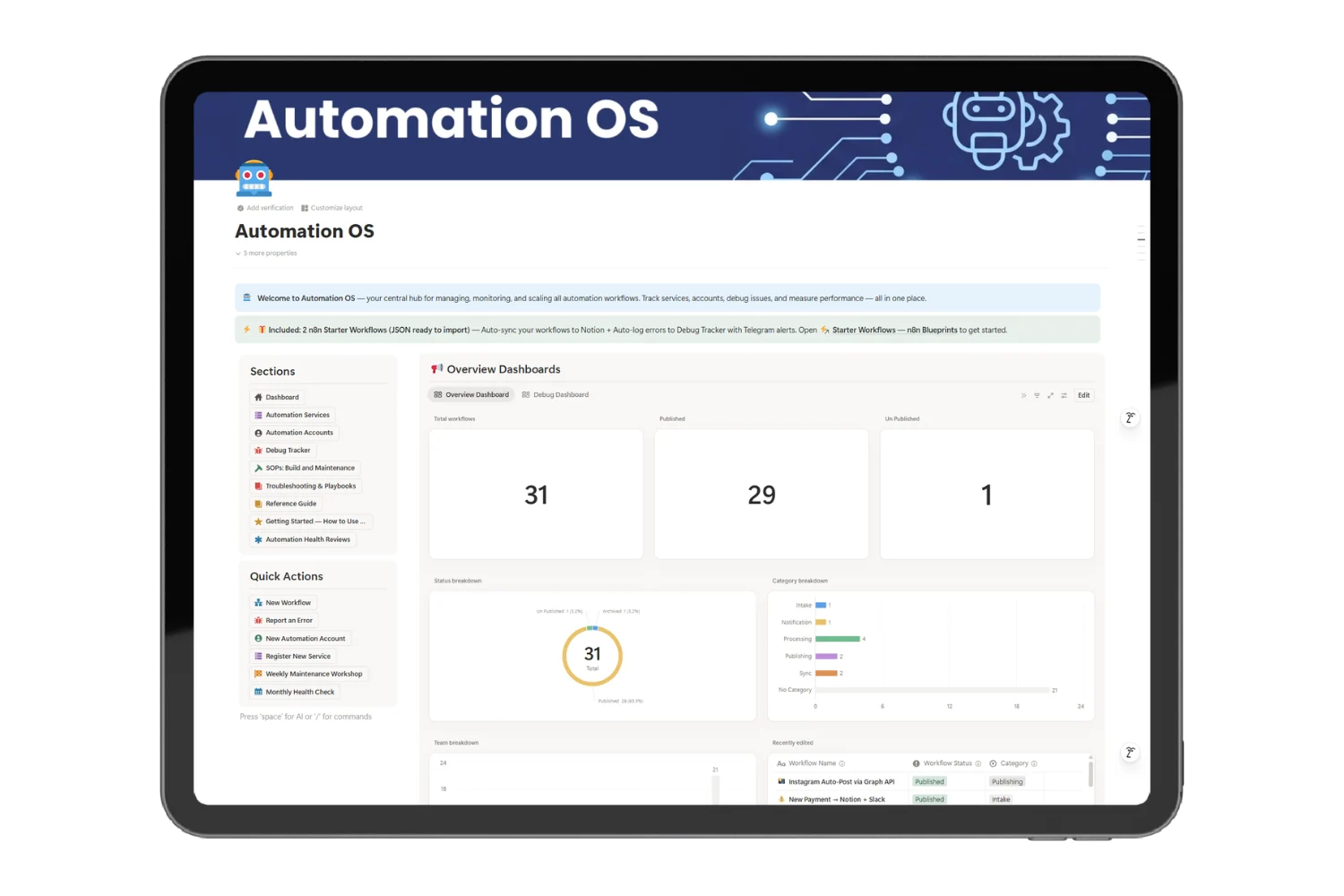
The hub manages multiple automations across n8n, Make, and Zapier from one screen. Five components carry the weight.
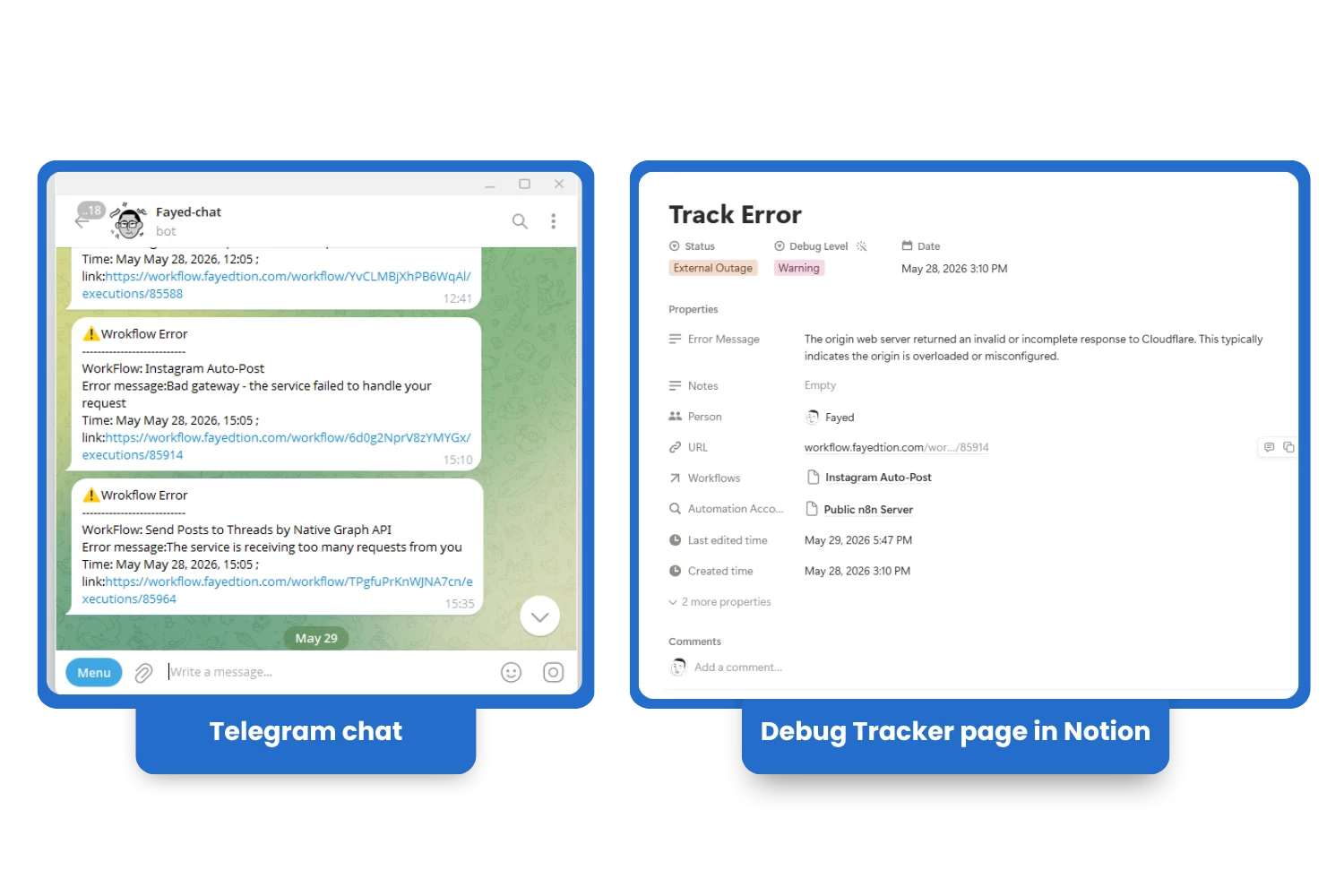
1. Workflow Command Center
Every live workflow lives as one row. Status, owner, category, version, SLA target, hosting account, monthly cost. A built-in formula auto-flags any workflow falling behind on its SLA. Green, yellow, red. Zero manual checking.
I scan this view every Monday morning during coffee. Five minutes tells me what’s healthy, what’s drifting, and what needs attention this week. No tab-switching. No platform jumping.
2. Auto-Error Logging With Telegram Alerts
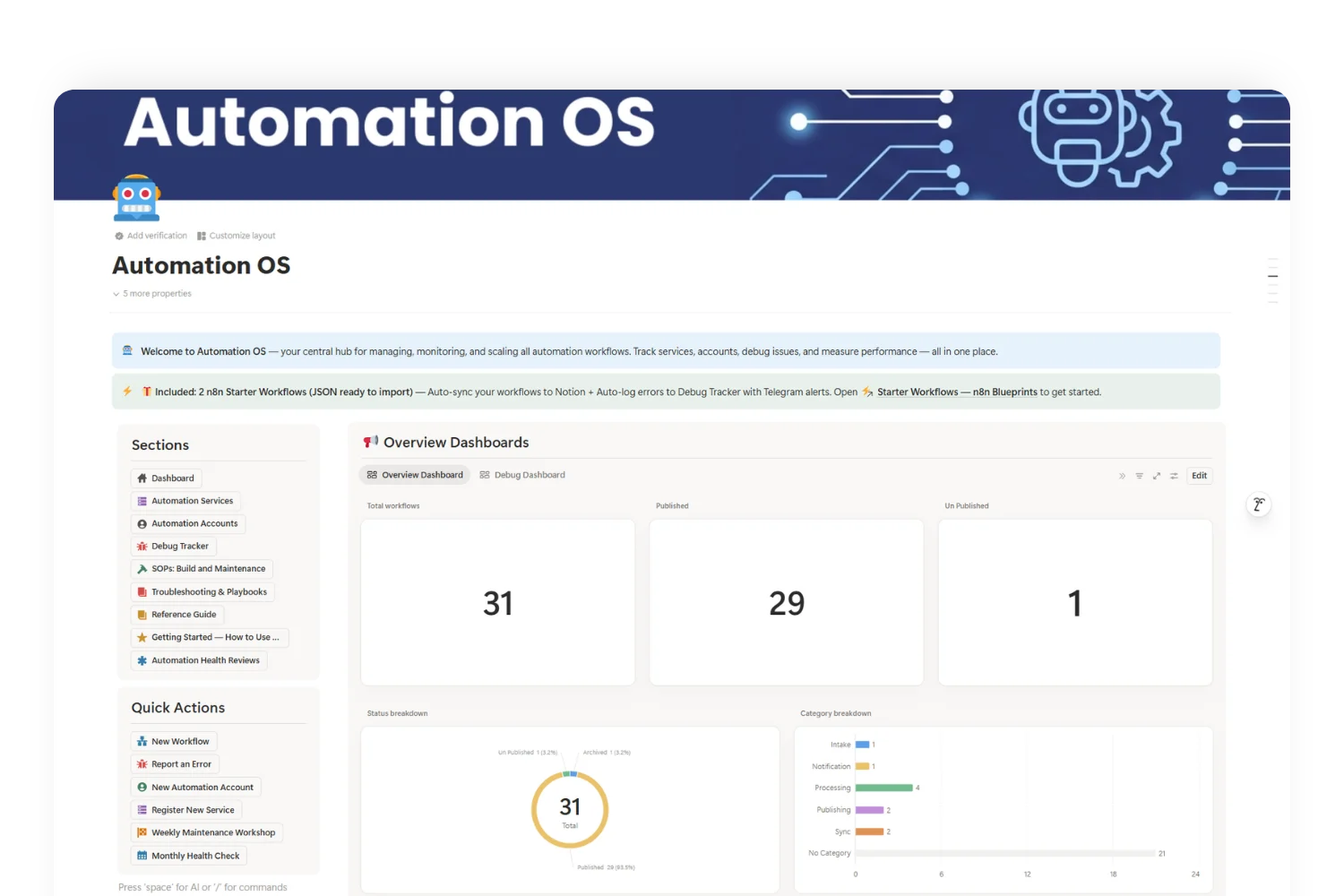
The single change with the highest payoff. An error workflow in n8n fires the moment any monitored workflow fails. It writes the error name, message, severity, timestamp, and a direct link to the failed execution into a Debug Tracker database in Notion. Then it sends a Telegram message to my phone.
I learn about errors before clients do. Most get resolved inside 20 minutes. The 2 AM Slack ping from the opening has not happened since I shipped this piece. Automation error monitoring stopped being a fire drill and became a queue.
3. Friday 20-Minute Maintenance
Every Friday at 4 PM, a calendar block opens the Weekly Maintenance Workshop template. It runs a 20 to 30 minute checklist: open errors reviewed, SLA breaches cleared, debug queue emptied, retirement candidates flagged. The template generates a health score and a list of action items rolled into next week’s tasks.
The first 12 weeks of running this raised my workflow uptime from “no idea” to 98.7% measured. Numbers I now share with clients.
4. Monthly Health Review
The deeper 45 to 60 minute review. Error trends by category, cost breakdown by hosting account, workflow pipeline health (build → live → retire), and a data-gap audit. Are any workflows missing logging? Credentials? Owners? The output: 3 to 5 system-level improvements queued for the next month.
This is the cycle which catches the slow drift. A workflow built 8 months ago might still run but cost 4x what its replacement would. Monthly review surfaces those.
5. Service and Credential Registry
Every service my stack touches lives in one database. n8n, Make, Buffer, Notion API, Google, Meta, OpenAI, Anthropic, Resend, Stripe. Linked to its accounts, credentials, hosting plan, and active workflows. Automation credential management stops being a Google Doc scattered with API keys (which is how I started). When a workflow breaks, two clicks tell me which account, which key, which plan, and which other workflows depend on it.
What Changes With a Centralized Automation Dashboard
Three outcomes worth naming:
- Quiet mornings. I open Notion, scan five tiles, and know the state of 180 workflows in under a minute. Before, I needed to open three browser tabs and 7 client n8n instances.
- Faster client conversations. Clients ask “is the lead routing working?” and I answer with a screenshot of their workflow row, no more “let me check and get back to you.”
- A record I own. If I drop n8n tomorrow and move to Make, the system moves with me. The hub is platform-agnostic. The platform is the engine. Notion is the cockpit.
Stop Firefighting Your Automations at 2 AM
A command center for every workflow, error, and credential across n8n, Make, and Zapier. Know what broke before your users do.
- Catch errors the moment they happen
- Track every workflow, status, and SLA in one hub
- Map services, accounts, and credentials in one place
- Run weekly health reviews with ready playbooks
The Ceiling Test: If 180 Fits, Your 5 to 20 Walks In Easy
Here’s the framing I wish someone had handed me 18 months ago: the system is sized by the worst day, not the average day. The hub holds 180 workflows. It holds 18 with room to spare. The Friday review takes 20 minutes at 180 workflows. At 18, it takes 5.
Workflow management software earns its keep on the day something breaks. The rest of the time it sits quietly. You install it not because today is hard, but because the day it gets hard will arrive without warning.
If you run 5 workflows for yourself, you need a 4-row dashboard and a Telegram alert. If you run 50 for clients, you need the credential registry and Friday reviews. Either way, the cost of installing the system before you need it is one afternoon. The cost of installing it after the 2 AM Slack ping is one bad client conversation plus one afternoon.
Frequently Asked Questions
Do I need a VPS to use this system?
No. The hub works whether your workflows run on n8n cloud, Make, Zapier, self-hosted n8n, or a mix. The system tracks workflows, not where they live. Self-hosting is a separate cost decision, not a prerequisite.
What if my stack is only Make or only Zapier?
Same system. The Workflow Command Center stores platform as a property. Filter by Make-only, Zapier-only, or both. The auto-error logging piece needs a small adapter inside Make or Zapier, an HTTP request to a Notion API endpoint instead of an n8n error workflow, but the rest is identical.
Is error monitoring realistic for non-developers?
Yes. The two n8n starter workflows ship as JSON. You import them, plug in two API keys (Notion plus a Telegram bot), and you’re done. No code. The same idea works in Make or Zapier with their built-in HTTP modules.
Is Notion fast enough at this scale?
At 180 workflow rows, 600+ error log rows, and 40+ service rows, the hub loads in under 2 seconds on my machine. Notion gets slow at 10,000+ rows in one database. I archive error logs older than 6 months into a yearly archive database, and the hub stays quick.
How long does the full setup take?
With the template, 10 minutes to duplicate, then 30 to 60 minutes to enter your current workflows. The error-logging n8n workflows take another 15 minutes to import and configure. Total: under 90 minutes to go from blank to live. Without a template, plan a full weekend.
Final Thoughts
Workflow automation is leverage. It saves time. It scales output. It compounds. But every unwatched workflow is a leak. Multiply leaks by 180 and the leverage flips against you.
The hub I built turns automation from a liability you ignore into an asset you observe. One dashboard. One review cycle. One source of truth for every workflow, every error, every credential.
Here’s the template I extracted from this system: Automation OS. It’s the Notion hub I run every day, packaged for anyone who wants to skip the weekend build. Workflows, debug tracker, credential registry, weekly and monthly review templates, the n8n starter workflows, all of it.
You might not run 180 workflows. You might run 8. The system was designed for the hard day either way.
