

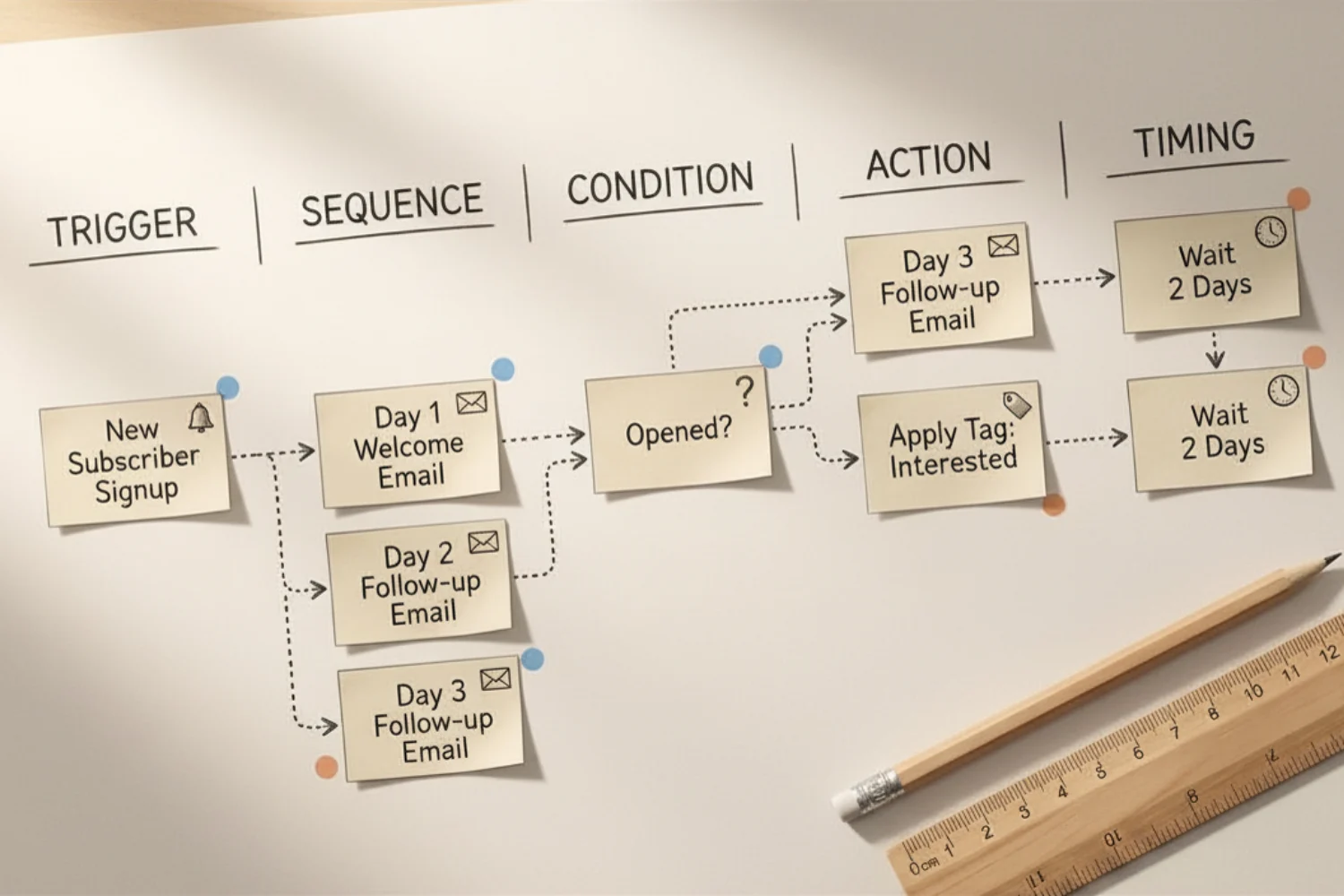
You opened your email tool, clicked “create automation,” and froze. Which trigger, which delay, which condition? Five tabs later, half a flow lives in your head and the other half is a mess of draft emails.
Email automation workflow planning fixes that. You sketch the whole flow on paper or in an email workflow template first, then move to your ESP only when the logic is locked. Less rework, fewer broken sends, faster launches. Solid marketing automation planning beats fast building every time.
This guide gives you the 5-column template, three worked examples (welcome, abandoned cart, re-engagement), and a clean handoff checklist for moving from plan to live workflow.
Why marketing automation planning beats building
Building a workflow inside your ESP feels productive. It is also where most mistakes ship.
Three problems show up every time someone skips the plan:
- Triggers fire wrong. A cart event without a 30-minute buffer pings people still checking out.
- Conditions clash. Two automations send to the same person on the same day because nobody mapped exit rules.
- Sequences drift. Email 3 contradicts email 1 because the writer lost the thread.
Fixing any of these inside a live ESP means pausing flows, exporting logs, and renaming triggers. Easy on paper, painful in production.
A 30-minute planning session saves a 3-hour rebuild. That is the whole pitch.
The 5 columns every email workflow template needs
Every automation, no matter the tool, breaks down into five columns. Lock these and the ESP setup is a copy job.
| Column | What it captures | Example |
|---|---|---|
| Trigger | The event that starts the flow | Subscribes to newsletter form |
| Sequence | The emails in order, each with a working subject line and goal | Email 1: Welcome + freebie |
| Condition | Branching logic, tags, exit rules | If purchased, exit flow |
| Action | What happens beyond sending (tag, score, move list) | Tag = “engaged” |
| Timing | Delay between steps and total flow length | Day 0, Day 2, Day 5 |
Build the columns in a sheet, in Notion, or on a whiteboard. The format does not matter. The discipline does.
Some teams call this an email automation map. Others call it an email workflow diagram. Same idea: every step, every condition, and every delay sits on one page before anyone touches the ESP.
Worked example 1: Welcome workflow
A welcome flow runs once per new subscriber. Goal: deliver the freebie, set expectations, and route the right people to your offer.
| Step | Trigger / Condition | Timing | Action | |
|---|---|---|---|---|
| 1 | Trigger: form submit | Welcome + freebie link | Immediate | Tag = “new_subscriber” |
| 2 | None | Quick win + your story | Day 2, 9:00 AM | None |
| 3 | None | Best resources roundup | Day 4, 9:00 AM | None |
| 4 | None | Soft pitch (low-ticket offer) | Day 6, 9:00 AM | Score +5 |
| 5 | If clicked offer, exit; else stay | Final nudge + CTA | Day 8, 9:00 AM | Tag = “warm” |
Five steps, eight days. Every email has a job. The exit condition on step 5 stops you from over-mailing people who already converted. The full sequence playbook lives in Welcome Email Sequences That Convert.
Worked example 2: Abandoned cart workflow
Higher stakes, tighter timing. The goal is to recover the sale before the interest cools.
| Step | Trigger / Condition | Timing | Action | |
|---|---|---|---|---|
| 1 | Trigger: cart created, no checkout | “Did something happen?” | 1 hour after abandonment | Tag = “cart_active” |
| 2 | If purchased, exit | Product proof + reviews | 24 hours later | None |
| 3 | If purchased, exit | Time-bound discount or bundle | 72 hours later | Tag = “cart_recovered” or “cart_lost” |
Three emails. The condition column does the heavy lifting: anyone who buys at step 1 never sees steps 2 or 3. The full three-email playbook is in Abandoned Cart Email Sequence: The 3-Email Recovery Playbook with Copy and Setup.
Worked example 3: Re-engagement workflow
Cold subscribers cost deliverability points. A re-engagement flow asks them to come back or quietly removes them.
| Step | Trigger / Condition | Timing | Action | |
|---|---|---|---|---|
| 1 | Trigger: 90 days no opens | “Still want emails from me?” | Day 0 | Tag = “winback” |
| 2 | If opened, exit | Best-of recap + CTA | Day 4 | None |
| 3 | If opened, exit | Final goodbye + unsubscribe link | Day 8 | If no open by Day 12, move to “inactive” list |
The trigger here is silence, not action. The condition column protects deliverability by sunsetting people who never engage.
The Email Marketing Toolkit walkthrough
You can sketch all of this in any tool. If you want a ready-to-use planning sheet, the Email Marketing Toolkit was built for this exact step. It includes:
- A workflow planner with the 5 columns pre-built
- Trigger and condition libraries you copy into rows
- A sequence outline page with subject line prompts and CTA fields
- A status tracker (Plan → Build → QA → Live → Pause)
- ESP-agnostic notes so the same plan ports to Mailchimp, MailerLite, Brevo, Kit, or Klaviyo
Fill the plan once and the build inside your ESP becomes a 20-minute copy job.
From plan to ESP setup: the handoff checklist
The plan is done. Before you open your ESP, walk through these 10 checks.
- [ ] Every email has a working subject line, preheader, and one clear CTA
- [ ] Every trigger has a buffer or delay if it ties to a live event
- [ ] Every condition has an exit rule for people who already converted
- [ ] Every tag or score change is mapped to a real downstream use
- [ ] Total flow length matches the audience’s patience window
- [ ] Time zone and send window are set (no 3 AM sends)
- [ ] Suppression list is checked (current customers, opt-outs)
- [ ] Plain-text fallback exists for compliance
- [ ] One person is named as the flow owner
- [ ] A QA send went to your own inbox and a teammate before launch
Tick all ten. Then build.
FAQ
How long should email automation workflow planning take?
Thirty to sixty minutes per workflow. Longer means you are also writing copy. Split those steps.
Do I need a tool to plan, or is paper fine?
Paper works for one flow. For three or more, use a sheet or Notion so you can reuse triggers and conditions across flows.
What if my ESP does not support a feature in my plan?
Note the gap in the plan, then list the workaround (manual tag, separate flow, etc.). Better to know before you build.
How often should I revisit a live workflow?
Quarterly review for revenue flows (cart, welcome, post-purchase). Monthly if you ran a promo or changed the offer.
Should every email have a CTA?
Yes, but not always a buy CTA. Reply, click, share, and read are all valid asks. One CTA per email.
Workflow planning is the most underrated email skill. Twenty minutes with a 5-column sheet saves you from the 2 AM “why did everyone get that email twice” panic.
The trigger column gets deeper in notion-960. The full series starts at notion-100.
