

You are the CEO, the marketer, the project manager, the accountant, and the customer support team. All at once. Every day.
And your “system” for managing all of this is a mix of sticky notes, browser tabs, scattered apps, and whatever you can remember before your morning coffee wears off.
That is not a system. That is survival mode.
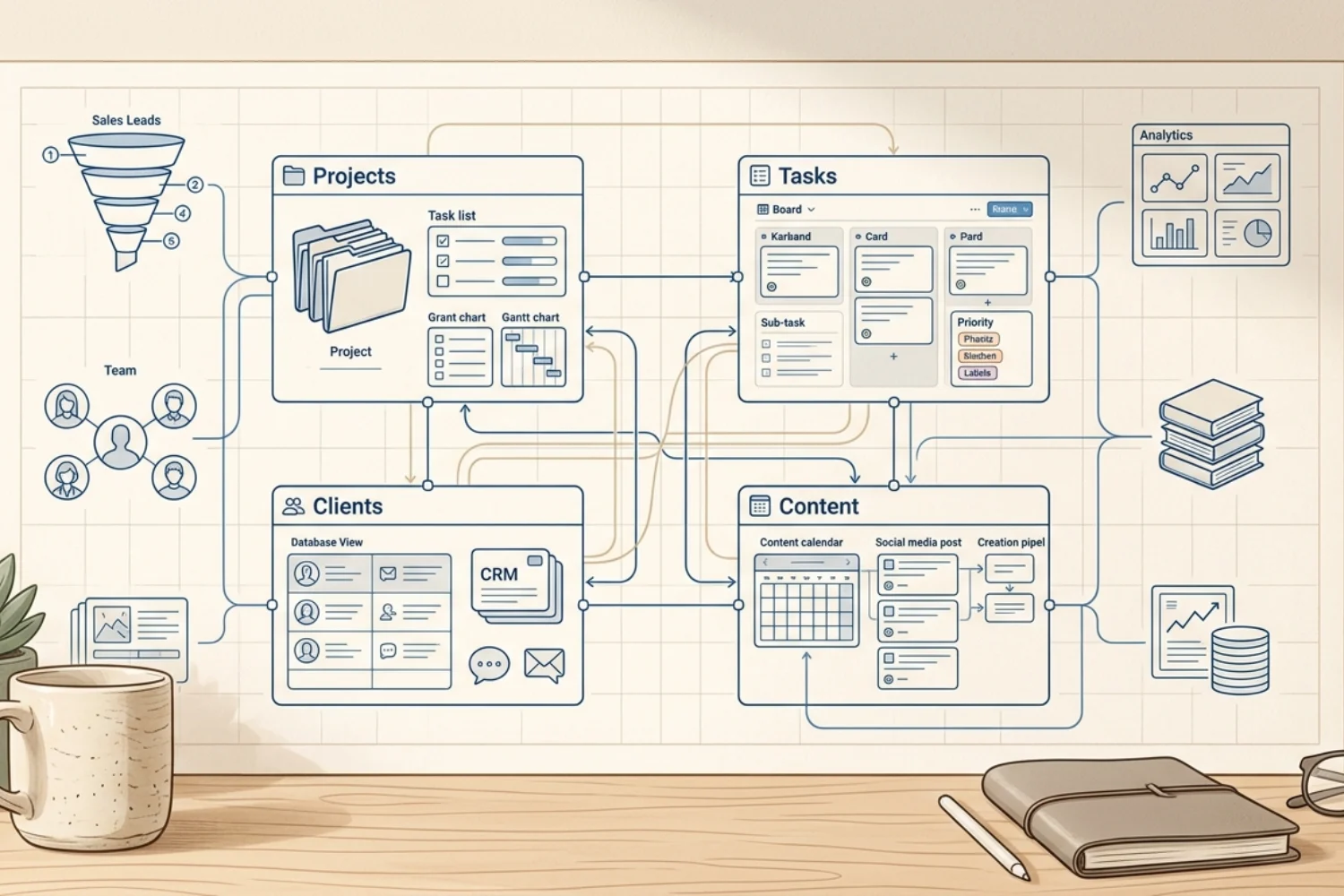
A business operating system changes this. It is a single, connected structure where every part of your business lives, links together, and works without you holding it all in your head. Projects connect to clients. Tasks connect to projects. Content connects to strategy. Revenue connects to deliverables.
This guide shows you how to build a business OS from scratch using Notion. No technical skills required. No expensive software. Just a clear framework and the discipline to use it.
Table of Contents
What You’ll Learn
What Is a Business Operating System
A business operating system is the backbone of how your business runs. It is the collection of processes, databases, and workflows that turn chaos into repeatable operations.
Think of it like the operating system on your computer. Windows or macOS manages files, applications, memory, and connections between programs. You do not think about it. It just works in the background so you can focus on your actual tasks.
A business operating system does the same thing for your company. It manages your projects, clients, tasks, content, finances, and knowledge so you spend less time organizing and more time executing.
Without a business operating system, you are the system. Every process lives in your head. Every connection between tasks requires your memory. Every decision requires you to check 3 different tools. That works when you have 2 clients. It breaks when you have 10.
Why Most Solopreneurs Do Not Have One
Most solopreneurs skip building business systems for solopreneurs because it feels like overhead. “I do not have time to build systems. I need to do the work.”
This is the trap. Without systems, you spend 30 percent of your time on administrative tasks that a good system would handle automatically. Finding files. Remembering next steps. Checking which client needs a follow-up. Figuring out what to work on today.
The other reason: most business system advice is designed for companies with 50 or more employees. Enterprise resource planning. Six Sigma. Complex automation flows. None of that fits a solopreneur or a 3-person team.
Business systems for solopreneurs need to be simple, flexible, and maintainable by one person. That is exactly what Notion enables.
The 5 Pillars of a Business Operating System
Every business operating system needs 5 core components. Miss one and the system has a gap. Build all 5 and your business runs like a machine.
Pillar 1: Project Management. Where you track what you are working on, for whom, and by when. Every active project has a status, a deadline, a client, and a list of tasks.
Pillar 2: Client and CRM Management. Where you track who you work with, their contact information, deal status, and relationship history. Every client connects to their projects and revenue.
Pillar 3: Task Management. Where you track the individual actions that move projects forward. Every task has a priority, a due date, and a link to its parent project.
Pillar 4: Content and Marketing. Where you plan, create, and track content that brings in new clients. Every piece of content connects to a topic, keywords, and a platform.
Pillar 5: Knowledge and SOPs. Where you document how your business works. Standard operating procedures, templates, reference materials, and lessons learned. This is the pillar that makes your business run without you holding every process in your memory.
How to Build a Business OS in Notion: The Framework
Here is the step-by-step process. Each step builds on the previous one. Do not skip ahead.
Step 1: Map Your Current Processes
Before you open Notion, write down every recurring process in your business. Client onboarding. Project delivery. Content creation. Invoicing. Weekly planning. Client follow-ups.
List them all. Do not organize yet. Just capture.
This gives you the raw material for your Notion operating system. You cannot systematize what you have not identified.
Step 2: Create Your Core Databases
Open Notion. Create 5 databases. These are the foundation of your entire system.
Projects Database. Properties: Project Name (title), Client (relation), Status (select: Not Started, In Progress, On Hold, Completed), Start Date (date), End Date (date), Priority (select), Revenue (number).
Clients Database. Properties: Client Name (title), Email (email), Company (text), Status (select: Lead, Active, Past), Deal Value (number), Source (select), Notes (text).
Tasks Database. Properties: Task Name (title), Project (relation), Status (select: To Do, In Progress, Waiting, Done), Priority (select: High, Medium, Low), Due Date (date), Assigned To (person).
Content Database. Properties: Title (title), Platform (select), Format (select), Status (status: Idea, Draft, Editing, Ready, Published), Topic (relation), Publish Date (date), Keywords (relation).
Knowledge Base. Properties: Title (title), Category (select: Operations, Marketing, Finance, Client Management), Last Updated (date), Tags (multi-select).
Step 3: Connect Your Databases with Relations
This is where your Notion operating system becomes powerful. Relations turn 5 separate databases into one connected system.
Link Projects to Clients. Every project belongs to a client. When you open a client page, you see all their projects.
Link Tasks to Projects. Every task belongs to a project. When you open a project, you see all its tasks.
Link Content to Topics and Keywords. Every piece of content targets specific topics and keywords. Your content strategy becomes trackable.
Link Projects to Revenue. When you add a revenue property to projects and relate projects to clients, you can see revenue per client across all their projects.
These relations mean you never need to cross-reference tools manually. Click a client and see their projects. Click a project and see its tasks. Click a task and see the full project context. Everything connects.
Step 4: Build Your Dashboard
Create a single dashboard page that shows the health of your entire business. Use linked database views filtered to show only what matters right now.
- Today’s tasks (filtered to due today or overdue)
- Active projects (filtered to In Progress)
- Client pipeline (filtered to Lead or Active)
- Revenue this month (filtered to current month)
- Upcoming content (filtered to next 7 days)
This dashboard becomes your daily starting page. Open it every morning. Scan it in 30 seconds. Know exactly what needs your attention.
Step 5: Document Your SOPs
For every recurring process you identified in Step 1, create a page in your Knowledge Base. Write the step-by-step procedure. Include checklists where applicable.
- Client onboarding: 8 steps from signed contract to kickoff call
- Content publishing: 6 steps from draft to live post
- Monthly invoicing: 5 steps from generating invoices to recording payments
- Weekly review: 4 steps from reviewing metrics to planning next week
These SOPs are not just documentation. They are insurance. When you are sick, overwhelmed, or ready to hire help, the system runs without your memory.
Step 6: Add Small Business Workflow Automation
Once your manual system works, layer in small business workflow automation to reduce repetitive work.
Notion automations: When a project status changes to “Completed,” automatically update the client status. When a task due date passes, automatically change priority to High.
Database templates: Create project templates with pre-filled tasks so every new project starts with the same checklist. Create content templates with pre-filled sections so every article follows the same structure.
Recurring tasks: Set up recurring database entries for weekly reviews, monthly invoicing, and quarterly planning.
Small business workflow automation in Notion is not about complex integrations. It is about removing the 15-minute tasks you do every day that add up to hours every week.
Step 7: Review and Iterate
Your business operating system is never finished. Schedule a monthly review.
- What processes changed? Update the SOPs.
- What databases need new properties? Add them.
- What views are you not using? Remove them.
- What is still falling through the cracks? Build a system for it.
The goal is continuous improvement. A 1 percent improvement to your system every month compounds into a radically different business in 12 months.
What a Complete Notion Operating System Looks Like
Here is the full picture when all 5 pillars are connected.
You open your dashboard and see 3 active projects, 7 tasks due today, 2 leads in your pipeline, 4,500 dollars in revenue this month, and 2 blog posts scheduled for this week.
You click on a project. You see the client, the task list, the deadline, and the revenue attached. You click on a task. You see which project it belongs to and the client context. You click on a client. You see every project, every task, and the total revenue generated.
Nothing lives in your head. Nothing lives in a separate tool. Everything connects in one Notion operating system.
This is what business systems for solopreneurs should feel like. Not enterprise software squeezed into a one-person operation. A lightweight, connected, customizable system that grows with you.
The Build vs. Buy Decision
You have two options for getting your business operating system.
Build it yourself. Follow the steps in this guide. Time investment: 4 to 8 hours for the initial setup. Advantage: perfectly customized to your workflow. Disadvantage: requires learning Notion databases and relations.
Buy a template. Purchase a pre-built Notion operating system template. Time investment: 1 to 2 hours for customization. Advantage: faster start with tested structure. Disadvantage: may not match your exact workflow without modifications.
Both work. Building teaches you the system deeply, which makes troubleshooting and customization easier long-term. Buying gets you running faster. Choose based on your available time and Notion experience.
Common Mistakes When Building a Business OS
Overbuilding on day one. Start with 5 core databases and a simple dashboard. Do not create 15 databases before you have used the first 5 for a month.
Not using the system daily. A business operating system only works if you open it every day. Make your dashboard the first thing you see each morning.
Ignoring SOPs. The databases track your work. The SOPs define how the work gets done. Skip SOPs and you still depend on your memory for processes.
No weekly review. Without a review habit, your system accumulates outdated tasks, stale projects, and inaccurate data. Schedule 30 minutes every Friday to clean up.
Trying to automate before the manual process works. Get the manual system running first. Automation amplifies a working system. It also amplifies a broken one.
Frequently Asked Questions
How long does it take to build a business operating system?
The initial setup takes 4 to 8 hours. Refinement happens over 2 to 4 weeks of daily use. By the end of month one, you will have a system that runs your business.
Do I need the paid Notion plan?
No. The free plan supports all databases, relations, views, and automations needed for a solo business operating system. The paid plan adds benefits for teams.
Can I use this framework outside of Notion?
Yes. The 5-pillar framework works in any tool that supports databases and relations. Notion is the recommended platform because it combines all 5 pillars in one workspace, but the concept is tool-agnostic.
What if my business changes?
That is the advantage of building your own system. Add properties, create new databases, update SOPs, and adjust views as your business evolves. A Notion operating system grows with you.
Is this only for solopreneurs?
No. This framework scales to teams of 10 to 20. Beyond that, you may need specialized tools for specific functions. But for small businesses, one connected workspace handles 80 percent of operational needs.
Key Takeaways
A business operating system is the backbone that connects every part of your business: projects, clients, tasks, content, and knowledge. Learning how to build a business OS in Notion starts with 5 core databases connected through relations. Business systems for solopreneurs should be simple, flexible, and maintainable by one person. Add small business workflow automation only after your manual processes work. Document your SOPs so the system runs without your memory. A Notion operating system replaces 4 to 5 scattered tools with one connected workspace. Review and improve monthly. The system is never finished, but it should always be working.
