You have 14 open problems across three tools. No owner. No priority. No weekly rhythm. Issues sit, customers wait, revenue leaks.
Issue Tracking Template turns that into: one issue, one next action, one owner, one weekly review. Done.
You Know This Problem
You spot a bug on your site. You write it in a random doc. Three weeks later, it is still there.
Your issues live in Slack threads, sticky notes, and half-finished task lists. Nobody owns them. Nobody reviews them. The same problems circle back every month.
You tried Jira. You tried Linear. Built for dev teams with sprints and backlogs. Overkill for a creator or a 3-person team who needs fast answers, not a project management degree.
The real cost? Every unresolved issue chips away at your momentum, your customer trust, and your revenue.
What If Every Issue Had One Clear Next Step?
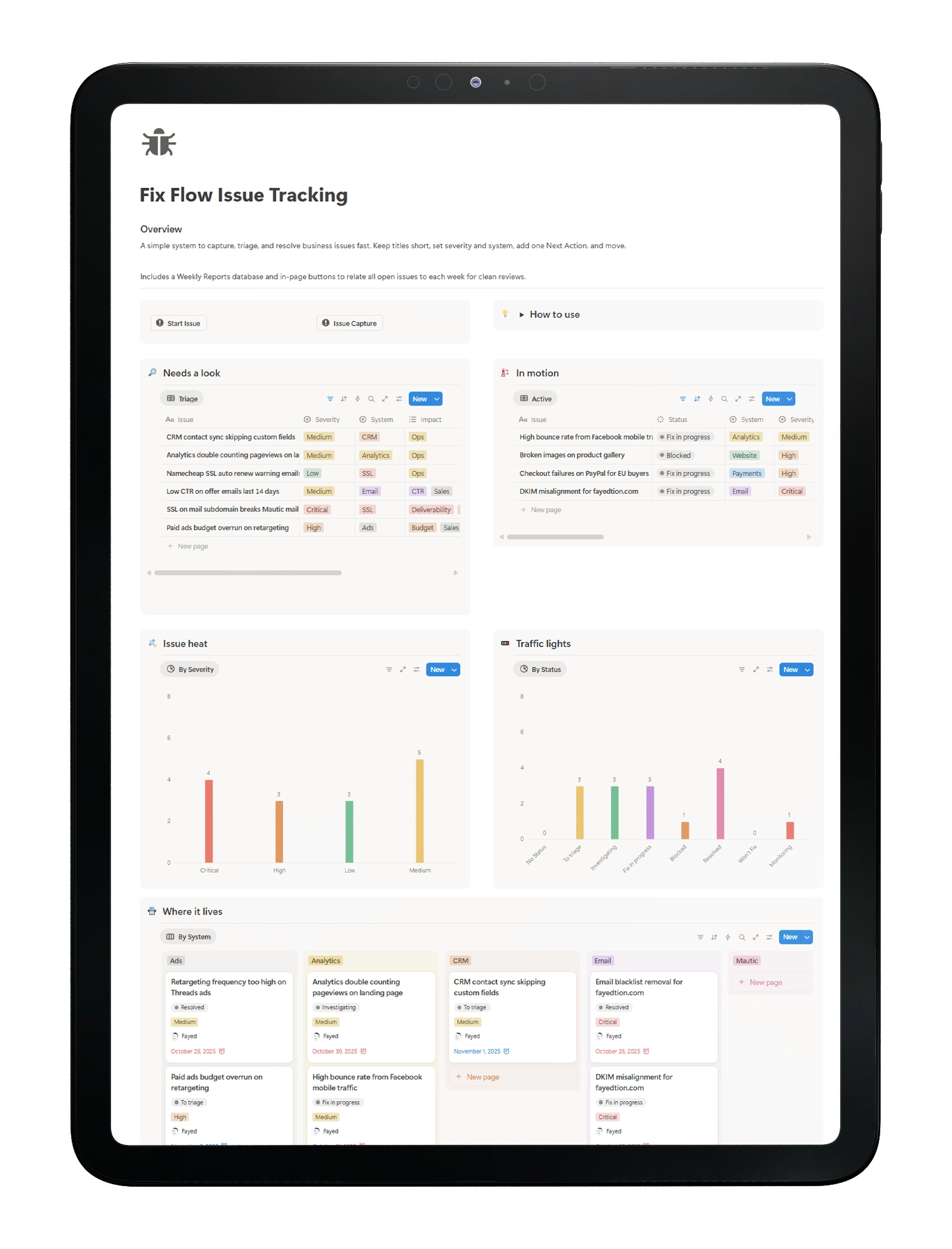
Imagine opening your workspace on Monday morning. Every open issue has an owner, a severity tag, a due date, and exactly one next action. No guessing. No digging. You triage in 5 minutes, work from a clean Active list, and close the week with a one-click report that shows what moved and what stalled.
That is what Fix Flow delivers. A simple, severity-based issue tracking system built entirely in Notion.
Why Fix Flow Instead of Another Bug Tracker?
Most issue trackers are built for engineering teams. Fix Flow is built for creators, small business owners, and lean teams running content, marketing, payments, and ops.
Here is the difference:
- One Next Action per issue. No multi-step checklists. One concrete step that keeps momentum.
- Severity + System tags. Know instantly if it is Critical or Low. Know if it lives in Website, Email, Payments, or CRM. Prioritize without debate.
- Weekly Reports in one click. Press a button. All open issues link to this week’s report. Your 5-minute review is ready.
- Self-contained. No external tools, no hidden rollups, no complex setup. Duplicate and run.
This is not another project management template dressed as an issue tracker. It is a focused system designed to do one thing well: get problems resolved.
How It Works (3 Steps)
Step 1: Capture. Log the issue with a short title, select the System (Website, Email, Payments, CRM, Analytics), set the Severity, and write one Next Action.
Step 2: Triage and Work. Assign an Owner and Due Date. Move from Triage to Active. Work from purpose-built views: Triage, Active, By System, Calendar.
Step 3: Review. Each Monday, create a Weekly Report. One click relates all open issues. Review in 5 minutes. Spot patterns. Close the loop.
No training needed. No onboarding docs. Duplicate, customize field names if you want, and start logging your top five issues today.
Real Problems, Real Fixes
Here is how creators and small teams use Fix Flow every week:
- Content Pipeline: YouTube thumbnail export fails on Tuesdays. System = Website. Severity = Medium. Next Action: check image optimization plugin conflict.
- Email Marketing: Welcome sequence sending twice for some leads. System = Email. Severity = High. Next Action: audit automation triggers.
- Payments: Stripe checkout throws a 3D Secure error for EU cards. System = Payments. Severity = Critical. Next Action: test SCA flow in live mode.
- Analytics: UTM parameters missing on paid ad links. System = Analytics. Severity = High. Next Action: add auto-tagging in ad platform.
- CRM: Lead source not syncing to custom field. System = CRM. Severity = Medium. Next Action: review field mapping.
One entry. One next step. Resolved.
What Others Are Saying
“I resolved 12 issues in my first week. The weekly report saved me 30 minutes every Monday.” — Solo Creator
“We tried Jira, Linear, and GitHub Issues. All overkill. Fix Flow gave us fast triage, clear owners, and a weekly snapshot.” — Small Agency Owner
“The severity tags changed how I prioritize. I stopped treating every bug as urgent.” — Notion Template Seller
Everything Inside Fix Flow
- Issues Database with Status, Severity, System, Owner, Due Date, Next Action
- Triage View for fast sorting and assignment
- Active View for current focus
- By System View to group issues by origin
- Calendar View for deadline-based planning
- Weekly Reports Database with Report Date, Week Number, Related Issues
- One-Click Report Button that auto-relates all open issues
- Prebuilt Charts by Status and Severity
- Sample Issues so you see the system working immediately
- Setup Checklist to get running in under 10 minutes
Nothing hidden. Nothing extra needed.
FAQ
Do I need other databases?
No. Fix Flow is self-contained. Issues and Weekly Reports live inside one template.
Can I customize statuses and fields?
Yes. Rename statuses, add Systems, tweak properties. The core structure stays stable.
Does this replace Jira or Linear?
For creator and small team workflows, yes. If you run full engineering sprints, keep your dev tool and mirror high-level issues here.
How do Weekly Reports work?
Open the week’s report. Click the button. All open issues link automatically. Review in 5 minutes.
Can I use this with my existing task manager?
Yes. Keep Next Action in Fix Flow for triage. Spawn tasks in your preferred app for deeper work.
What do I get after purchase?
A Notion template link. Click to duplicate into your workspace. Start logging issues immediately.
Stop Letting Issues Pile Up. Start Shipping Fixes Today.
Every week you wait, problems compound. Customers notice. Revenue drifts.
Fix Flow gives you a focused, lightweight Notion issue tracker with severity-based triage, clear ownership, and one-click weekly reports.
Duplicate the template. Log your top five issues. Run your first 5-minute review next Monday.