

Monday morning. Five tabs open: a notes app with half-formed hooks, last week’s scheduling spreadsheet, a Google Doc with unfinished ideas, a saved-posts folder, and a blank Notion page. All five close by lunch. Zero posts go out.
If this loop feels familiar, the fix is not another content calendar. It is a notion social media planner built for how an ADHD brain actually works: fast capture, single-purpose desks, and zero blank pages.
This piece walks through the exact notion social media planner setup solo creators and small operators use to publish consistently without willpower running out by Wednesday.
Why a Notion social media planner beats a spreadsheet
Spreadsheets and standalone schedulers assume the creator arrives with clarity. ADHD creators and solopreneurs rarely do. The Monday brain wants to plan; the Wednesday brain wants to create; the Sunday brain wants to review. Different jobs, different mental modes.
A notion social media planner separates those jobs into dedicated spaces so the wrong brain never has to touch the wrong task. Idea capture goes to one spot. Planning goes to another. Production, publishing, and review each get their own desk. The system does the sorting; the creator does the creating.
Built for ADHD creators and solopreneurs
The ADHD Content Planner is a notion social media planner designed around 3 constraints ADHD users hit every week:
- Ideas disappear: the gap between “good idea” and “I’ll write it down later” is where 80% of content dies.
- Blank pages paralyze: starting from zero every session drains the creative energy budget.
- Reviews get skipped: no closed-loop learning means the same mistakes repeat across quarters.
Solopreneurs feel the same 3 pains, just with the added weight of client work eating into content time. The planner solves both audiences with the same architecture.
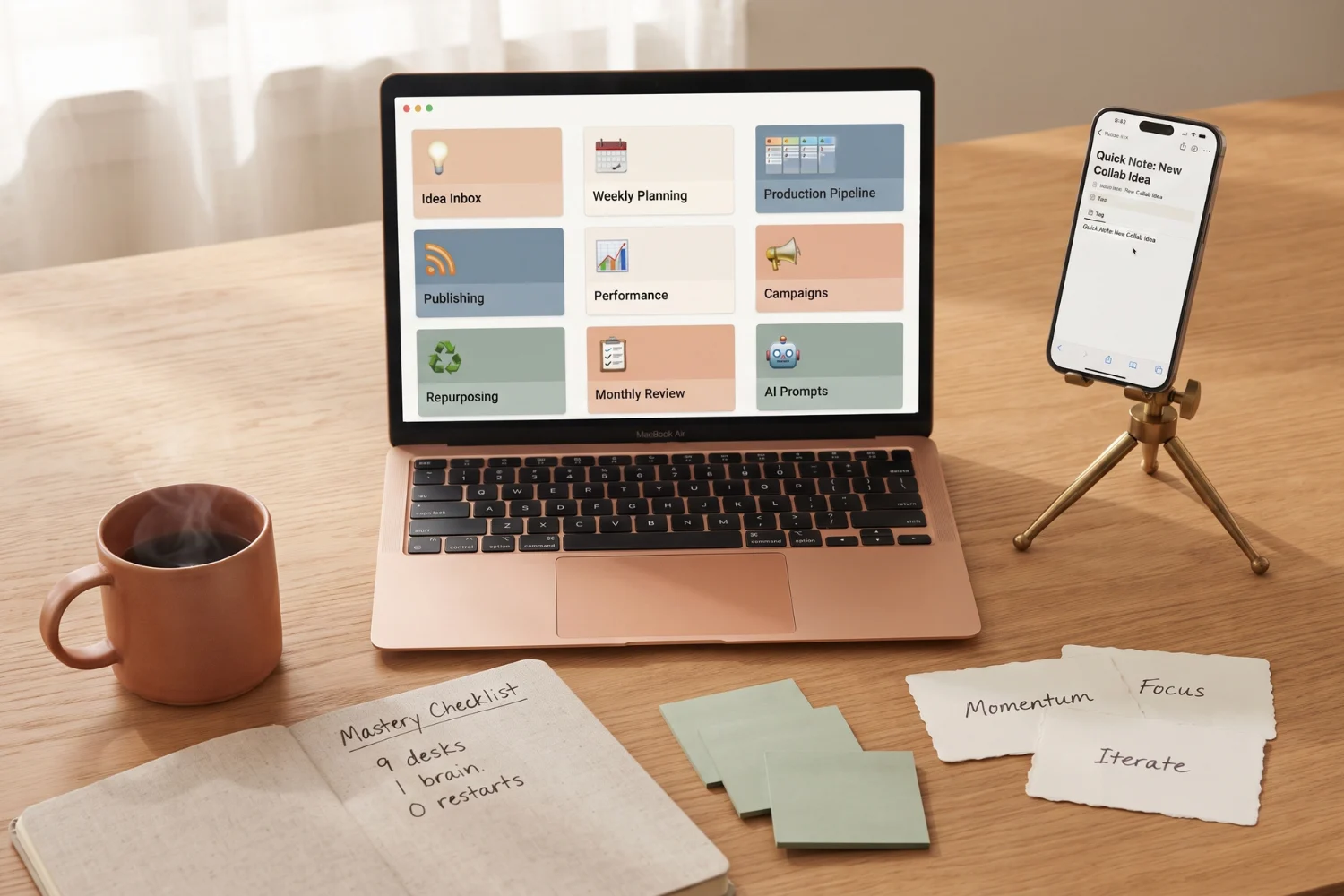
9 desks · one job each · no overwhelm
The planner ships with 9 single-purpose desks:
- Idea Inbox: brain-dump every idea within 5 seconds.
- Weekly Planning Desk: pick posts for the week in under 30 minutes.
- Production Pipeline: see exactly where every piece of content sits right now.
- Publishing Command Center: know what goes live next without digging.
- Performance and Decision Desk: review results, decide what to repeat.
- Campaign Command Center: focused campaigns without scattered attention.
- Repurposing Desk: turn one post into 5 without starting over.
- Monthly Growth Review: close the month with data, not guessing.
- AI Prompt Command Center: 50+ prompts organized by workflow stage.
One open desk = one active brain mode. No more Sunday-brain trying to write Monday-brain’s captions.
Quick capture · never lose an idea again
7 quick-capture forms live inside the planner. Voice-to-idea from a phone. Reel-caption capture from Instagram. Hook capture from a browser. Every form drops the raw idea into the Idea Inbox with source, platform, and status auto-filled.
Real use:
- Idea hits in the shower: open the phone form, one line, done.
- Client meeting sparks a post angle: browser form, tag it Client Content, back to the meeting.
- Voice memo of a Threads hook: paste into the form, review at Weekly Planning Desk time.
ADDitude Magazine documents “working memory offload” as one of the highest-impact ADHD strategies. Quick capture is that strategy applied to content.
AI prompt bank · kill blank-page paralysis
50+ prompts sit inside the AI Prompt Command Center, grouped by workflow stage: idea generation, hook writing, caption polish, carousel outlines, YouTube scripts, and reel scripts. Each prompt is copy-paste ready with placeholders for topic, audience, and tone.
Real use:
- Blank Reel script at 9 PM: open Reel Script prompt, fill 2 placeholders, get a 30-second outline.
- Weak hook: paste the current hook into Hook Rewrite prompt, choose 1 of 3 rewrites.
- Repurpose a blog into a carousel: use Blog-to-Carousel prompt, get 8-slide outline.
Buffer research on creator burnout points to “decision volume” as the top driver of quitting. Pre-written prompts cut decision volume near zero.
Platform templates · Reels, Carousels, YouTube, Threads, Blog, Pins
Every platform gets a ready-made template with hook slot, body structure, CTA slot, and hashtag pool. No blank page ever loads at the start of production.
Real use:
- Weekly Planning Desk pulls the platform template on assignment.
- Production Pipeline shows the template mid-fill with a completion percentage.
- Publishing Command Center pushes the finished piece to the schedule.
Later and Hootsuite content workflows follow the same template-first pattern; the planner brings the pattern inside Notion instead of a separate scheduler.
Instagram DM automation · runs while you create
An n8n workflow ships with the planner. Comments containing a keyword on selected Instagram posts trigger an auto-DM with a link, lead magnet, or reply. Import the JSON, plug in an Instagram Business account and an n8n instance, ready in 15 minutes.
Real use:
- Reel with 500 comments overnight: 500 DMs go out automatically, no manual work.
- Lead-magnet giveaway post: keyword “guide” triggers a DM with the download link.
- Free-tool launch: comment “send it” delivers the tool link with a follow-up prompt.
The automation runs while the creator writes the next batch of content. Time compounds instead of stacking.
When to switch to a Notion social media planner
Stay on the current setup if 3 or more of these are already true:
- Weekly output above 5 posts across 2 platforms with no restarts.
- Ideas captured within 60 seconds of the spark, every time.
- Monthly review of top and bottom performers happens on schedule.
- Repurposing runs on a documented playbook, not memory.
- Zero blank-page sessions in the last 2 weeks.
Switch to the planner if 3 or more of these hit:
- Monday planning takes over 90 minutes and half the plan gets abandoned by Wednesday.
- Ideas live in 3+ apps and none of them sync.
- Reels get planned but never scripted; scripts get written but never filmed.
- Reviews get skipped 2 months in a row.
- Restart every quarter with a fresh system.
Frequently asked questions
Is the ADHD Content Planner Notion-only or does it need extra apps?
Core workflow runs 100% inside Notion. The Instagram DM automation uses n8n (self-hosted or cloud) and an Instagram Business account. Every other feature is native.
Does the planner replace tools like Later, Buffer, or Hootsuite?
Partially. It replaces the planning, ideation, and repurposing layers. Actual scheduled posting still works best through Later or Buffer; the planner feeds those tools cleanly.
How long does setup take for a solo creator?
About 30 minutes to duplicate the template, connect Instagram (optional), and drop in 3 sample ideas. Full workflow adoption takes 1-2 weeks.
Is this a good notion social media planner for teams?
Yes for teams of 2-3. Each desk supports assignee fields and status flows. Beyond 3 members, pair with a project OS for handoff clarity.
What if my ADHD brain resists the planner itself?
Start with only the Idea Inbox and Weekly Planning Desk. Ignore the other 7 desks for 2 weeks. Once capture and planning stick, add Production Pipeline. Never all 9 at once.
Final thoughts on the Notion social media planner for ADHD brains
A notion social media planner does one thing spreadsheets and standalone schedulers cannot: separate the planning brain from the creating brain from the reviewing brain, each with its own dedicated workspace.
For ADHD creators and solopreneurs, that separation is not a nice-to-have. It is the difference between publishing 3 weeks straight and quitting on week 2.
Grab the ADHD Content Planner and start with the Idea Inbox tonight. One capture. That is the whole first commitment.
