


Notion for course creators is one workspace holding four jobs at once: curriculum design, student CRM, cohort delivery, and launch tracking. The tools most creators pay for (Kajabi, Teachable, Circle, ConvertKit) overlap enough on the middle 60% of work you run a solo course business from Notion alone until revenue justifies specialized delivery software.
This guide on Notion for course creators covers three setup routes based on how you sell, a seven-step foundation build, the cohort delivery workflow with T-minus timing, six Published templates matched to each route, and five questions creators keep asking before they commit.
Table of Contents
What You’ll Learn
Why Notion Wins for Course Creators (2026 Reality)
Course platforms bundle five features: video hosting, curriculum builder, student portal, email drips, and payment gate. Three of the five (curriculum, portal, drips coordination) live comfortably inside Notion using databases, relations, and templates. Video hosting stays with Vimeo or YouTube Unlisted. Payment goes through Gumroad, Stripe Payment Links, or Podia checkout.
Notion for course creators pays off in four spots:
- Curriculum edits ship in 30 seconds instead of re-uploading a lesson to Teachable.
- Student notes and support threads live next to each learner record with no context-switch.
- Launch campaign, sales dashboard, and content calendar share the same source of truth as the course itself, so a Way 2 cohort launch shows enrollment counts on the same page the marketing plan sits on.
- Free plan handles small cohorts (under 100 students) with no monthly fees. A five-cohort year on Kajabi runs $1,776. The same year on Notion Plus with Gumroad on top runs about $200 net of Gumroad’s transaction fees.
Notion 3.4 shipped the Dashboards view type in March 2026, which lets a course creator show enrollment counts, revenue-per-cohort, and completion percentage as chart cards on a single page. Custom Agents on the Business plan (300 free credits per workspace per month after May 2026 GA) fire on database triggers, so a “New Enrollment” row inserted into the Students database sends a welcome sequence draft to the Emails database without a manual step.
Three Routes to Sell a Course from Notion
Pick one before touching a database.
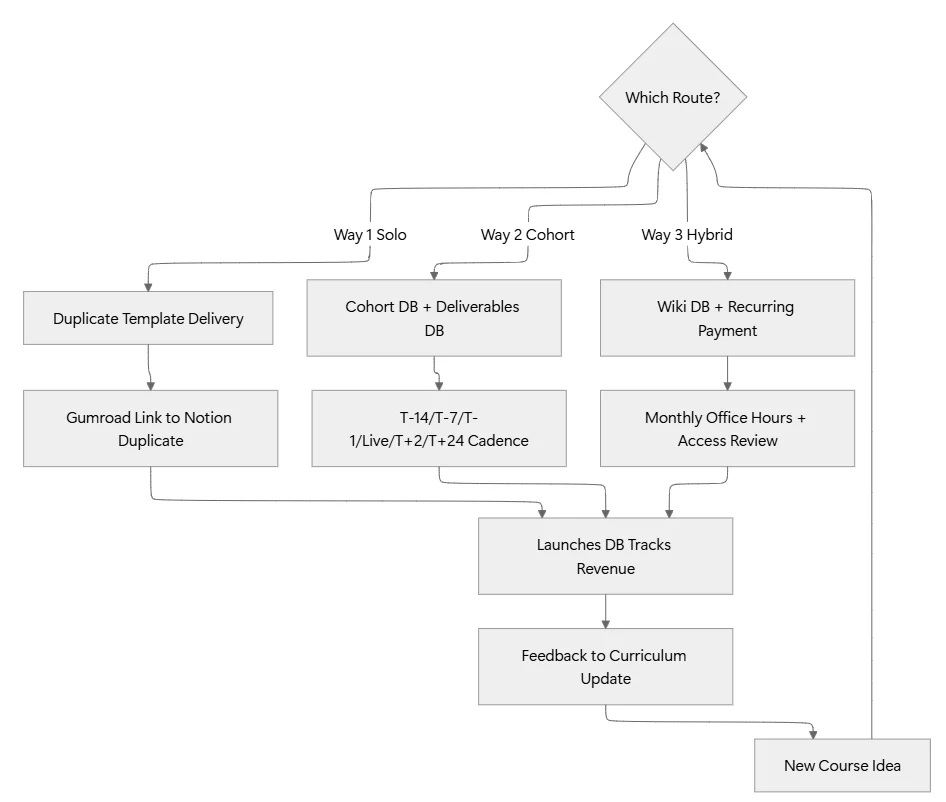
Way 1: Evergreen Solo Course (Notion as Delivery)
Best when the course is self-paced, the module count is under 12, and price sits between $47 and $297.
You host the entire course as a duplicated Notion template. Sale on Gumroad triggers an email with a “Duplicate this template” link. The buyer clicks, pulls the workspace into their own account, and works through the modules at their own pace. No student portal, no login system, no monthly platform fee. You keep the master copy in your workspace, edit lessons in one place, and re-send the duplicate link when the curriculum ships a major update.
Revenue signal: one solo creator I audited runs a $67 Notion-native Airtable-alternatives course this way and clears $2,800 monthly with zero platform costs.
Way 2: Cohort Course (Notion as Command Center, Circle for Community)
Best when the price sits between $497 and $2,997, cohorts run 4 to 8 weeks, and community drives the outcome.
Notion for course creators running cohorts becomes the operations spine (curriculum database, student CRM, cohort calendar, coach assignments, Q&A log). Live sessions go on Zoom. The community layer lives on Circle, Slack, or Discord. Lesson videos sit on Vimeo Pro with password protection. The student never enters your Notion workspace; the coach uses Notion privately to track every learner, every deliverable, and every renewal signal.
Revenue signal: cohort creators charging $1,497 for a 6-week program with 25 seats clear $37,425 per cohort with 4 to 6 hours per week of ops load once the Notion spine is built.
Way 3: Course + Membership Hybrid (Notion as Portal)
Best when the course seeds a $27 to $97 monthly membership after graduation.
The course is a lead magnet or entry product. Graduates roll into a monthly membership with recurring value: monthly office hours, resource library updates, and a peer accountability group. Notion holds the shared member wiki as a Wiki database, the office hours calendar, and the resource library. Payments run through Gumroad Memberships or Stripe recurring. Access control is a shared Notion page with public-with-permissions sharing plus a monthly access review.
Revenue signal: hybrid setups compound. A 250-member community at $47/month runs $141,000 ARR with roughly $8/month per member in tool costs (Notion + Vimeo + Stripe).
The 7-Step Foundation Every Course Creator Needs
Build these before the first module ships. All three routes above run on the same seven-piece scaffold, and the foundation stays identical whether you run Notion for course creators solo, cohort-based, or hybrid.
Step 1: Courses Database
Title property = course name. Properties: Route (Solo/Cohort/Hybrid), Status (Draft/Live/Retired), Price, Launch Date, Modules count (rollup), Enrollment count (rollup), Revenue (rollup), Owner. Each row is one product; a bundle counts as its own row.
Step 2: Modules Database
Title = module name. Properties: Course (relation to Courses), Order (number), Lesson count (rollup), Status (Outlining/Recording/Editing/Published), Runtime target, Owner. A course holds 6 to 12 modules; a module holds 3 to 6 lessons.
Step 3: Lessons Database
Title = lesson name. Properties: Module (relation to Modules), Order (number), Video URL, Runtime, Transcript status, Worksheet link, Status (Outline/Script/Recorded/Edited/Published). Add a formula property called “Full Path” (Course > Module > Lesson) for fast lookup.
Step 4: Students Database (CRM)
Title = student name. Properties: Email, Cohort (relation, empty for Way 1), Course purchased (relation), Purchase date, Renewal status, Completion percentage (formula from Progress relation), Owner (empty for Way 1). Every learner gets one row across all your products; a repeat buyer holds a Course purchased relation with multiple entries.
Step 5: Cohorts Database (Way 2 only)
Title = cohort code (e.g., “Copywriting 06 · Sept 2026”). Properties: Course (relation), Start date, End date, Seat count, Filled seats (rollup), Coach (Person), Zoom link, Circle link, Kickoff email sent (checkbox). One row per delivery run.
Step 6: Deliverables Database (Way 2 and 3)
Title = deliverable name (e.g., “Week 3 Portfolio Review · Sarah K.”). Properties: Student (relation), Cohort (relation), Type (Homework/Portfolio/Q&A/Certification), Status (Submitted/Reviewed/Approved), Feedback link, Due date. The Deliverables database is the operational heart of any coached program.
Step 7: Launches Database
Title = launch name. Properties: Course (relation), Launch window (date range), Goal revenue, Goal seats, Actual revenue (rollup), Actual seats (rollup), Marketing tasks (relation to Tasks database). One row per launch event.
Connect the seven with relations. Deliverables roll up to Students. Students roll up to Cohorts. Cohorts roll up to Courses. Lessons roll up to Modules to Courses. Launches read from Courses. The whole system is one bidirectional graph the second you finish Step 7.
The Cohort Delivery Workflow (T-Minus Timing)
Way 2 lives or dies on cadence. Here is the exact rhythm the highest-performing cohort operators run inside Notion for course creators:
T-14 days from cohort start. Kickoff email drafted in the Emails database. Zoom links generated. Circle community pre-populated with welcome thread. Deliverables rows pre-created for Week 1 for every enrolled student.
T-7 days. Enrollment cutoff. Final seat count locked into the Cohort row. Onboarding sequence fires: three emails over three days (kickoff details, prework, community access).
T-1 day. Coach dry-runs the first live session. All Week 1 deliverables opened for submission in the Deliverables database.
Live session day. Attendance logged as a property on each Student row. Session recording uploaded to Vimeo within 3 hours. Recording link pasted into the Lessons row for the session. Circle post announces the recording.
T+2 days after each session. Feedback loop closes. Each Deliverable row moves from Submitted to Reviewed with feedback link filled. Students missing two consecutive deliverables get a check-in message logged in their Student row.
T+24 hours after cohort end. Feedback survey sent (Typeform link stored on Cohort row). Results imported into a “Cohort Retrospective” page. Renewal offer prepared for graduates who fit the Hybrid route.
Custom Agents on the Business plan handle two triggers here: a “Deliverable Overdue Agent” runs daily and messages the coach with a list of students behind schedule, and a “Cohort Retrospective Agent” fires 24 hours after cohort end and drafts the retro page from the Deliverables database averages. Both cost 3 to 6 credits per run on Sonnet 4.6.
Content Production Pipeline (All Routes)
The pipeline sits inside the Modules and Lessons databases. Each lesson moves through six statuses: Outline, Script, Recorded, Edited, Published, Retired. A Kanban view of the Lessons database grouped by Status shows the full production backlog on one screen.
For solo course creators shipping evergreen products, batch by status: outline six lessons in one sitting, then script six, then record all six in one recording day. Batching the same status across modules cuts total production time by 40% versus finishing one lesson end-to-end before starting the next.
Store scripts inside the Lesson page content, not in a separate Google Doc. The Notion transcript sits directly under the video URL, so edits sync with lesson updates. Worksheet PDFs get linked as file properties on the Lessons row.
Community Layer: What Belongs Where
Community and course delivery split cleanly across three surfaces in a Notion for course creators setup. Notion holds structured data (student records, deliverables, curriculum). Circle or Slack holds conversation. Vimeo holds video.
Do not host live discussion inside Notion comments. Notion comments work for internal coach notes on a Student row; they collapse under the volume of a real cohort chat. Same rule applies to Slack: use it for cohort community, not for storing curriculum content. The moment a lesson gets pasted into a Slack thread, it is lost to search.
The one exception is the shared Wiki database in Way 3. A membership program benefits from a member-editable Wiki (recipes, playbooks, examples). Turn on Wiki mode on a database, set sharing to member-can-comment plus member-can-edit-child-pages, and audit contributions monthly with a “Wiki Contributions” view sorted by Last edited time descending.
Launch Playbook (Runs From the Launches Database)
A launch row in the Launches database points at a Course row and a Marketing Tasks relation. The Tasks database holds the daily push work: email drafts, thread outlines, sponsor coordination, ad copy variations. A launch of a $497 cohort with 25 seats needs about 45 tasks spread across a 21-day window. Batch them into three phases:
- Warm-up (Day 1 to 10): content seeding the problem the course solves. No sales language. Newsletter, blog post, thread, podcast guest spot.
- Cart-open (Day 11 to 17): seven emails, three social pushes per platform, one webinar or live Q&A. Cart-open week does 55% of total revenue for a well-warmed cohort.
- Cart-close (Day 18 to 21): two emails per day, one “last 24 hours” push, one “cart closed” thank-you. Cart-close week does 25% of revenue.
Every task in the Marketing Tasks relation lives inside your normal Tasks database. A dashboard on the Launch row shows the tasks Kanban grouped by phase, so a solo operator sees warm-up work while cart-open is still 8 days out. Notion for course creators handling launches this way keeps the marketing calendar and revenue numbers on one page.
Skip the 3-Hour Setup with These Templates
Building the seven-piece foundation from scratch takes about 3 hours. These six Published templates cut it to 25 minutes each once you pick your route.
Foundation for every route (start here if you have zero systems yet):
- Notion Starter Pack: Ships the Tasks database, dashboard structure, and CRM scaffolding the whole workflow rides on top of. Every other template on this list stacks over it.
For Way 1 (Evergreen Solo Course delivered as duplicated Notion template):
- Digital marketing Agency: The Digital Marketing Agency template holds the launch campaign structure, funnel copy, and cart-open/cart-close cadence a solo course launch needs. Strip out the client sections, keep the launch dashboard.
- Content Repurposing OS: A single lesson recorded on Loom or Zoom gets pulled apart into a thread, a newsletter section, a YouTube short, and three LinkedIn posts. This template holds the workflow to convert one course lesson into six pieces of top-of-funnel content per module.
For Way 2 (Cohort Course with community and coaching):
- CRM V.2: The Students database blueprint. Wire this to your Cohorts database and Deliverables database and you have the operational spine of a coached cohort in 40 minutes.
- Focus Sprint Desk: The 6-week cohort structure mapped 1:1 to a Focus Sprint. Import this and each cohort week gets its own sprint page with deliverables, live session slot, and retrospective row already scaffolded.
For Way 3 (Course + Membership Hybrid with monthly recurring):
- Email Marketing Toolkit: Handles the monthly value cadence a membership needs: welcome sequence, monthly office-hours reminder, quarterly renewal outreach, and the graduate-to-member conversion flow. Wire this to the Students database and the Members database and the recurring emails write themselves.
FAQs
Do I need Notion Business plan for a course creator setup?
No. Notion Plus ($10/month or $8/month annual) handles everything through Way 3 with under 500 students. Business plan makes sense when you need Custom Agents to automate deliverable follow-ups and cohort retrospectives. Under 200 students, Plus is enough.
How do I protect course content if the whole workspace is inside Notion?
Two options. For Way 1, sell a duplicate link and accept a 4 to 8% content-leak rate as the cost of low-friction delivery. For Way 2 and 3, keep the curriculum inside your workspace (not shared publicly), share individual lesson pages with password-protected sharing links, and rotate the links per cohort. Video stays on Vimeo Pro with password + domain lock.
Notion or Circle for the community layer?
Circle for cohorts above 30 students. Notion comments break down over 30 concurrent threads. Under 30 students, a shared Notion page with a “Cohort Discussion” section works fine for the 4 to 8 weeks the cohort runs.
How do I handle refunds and access removal?
Refunds fire from Gumroad or Stripe. Access removal is a manual step in the Students database (change Status from Active to Refunded and remove the student from any shared Circle or Slack workspace). For Way 1 duplicate-template delivery, refunds are honor-system; a refunded student keeps the duplicated workspace but loses access to future curriculum updates.
What is the smallest Notion for course creators setup a solo builder ships in 2026?
Six modules, 24 lessons, 4-hour total runtime, Gumroad checkout, Notion delivery via duplicate template, and a 5-email post-purchase sequence. Total build time is 3 to 4 weekends. Pricing lands between $47 and $147 for evergreen and clears $1,500 to $4,000 monthly once a top-of-funnel content pipeline is running.
Ship Your First Course This Quarter
The workspace stops being the bottleneck the day the seven-piece foundation goes live. From there, the constraint moves to content production speed and audience size, both of which grow linearly with weekly output. Pick a route, build the foundation in one weekend, ship the first module inside two weeks, and let the Launches database tell you which price point and which cohort length converts fastest.
The creators clearing five figures a month from Notion-delivered courses treat the workspace as a durable asset, not a stopgap. Every enrollment, every deliverable, every feedback survey compounds into a curriculum growing sharper each cohort. Course platforms let you rent this infrastructure. A Notion workspace lets you own it.
