
Let’s be honest! Traditional planners and ADHD brains don’t always mix. Deadlines slip through the cracks, tasks pile up, and the sheer volume of college life can feel overwhelming. But what if your planner could adapt to how your brain actually works, instead of forcing you into a rigid system? That’s where Notion comes in.
This guide will show you how to turn Notion into the ultimate ADHD-friendly student planner, one that bends with your focus, keeps priorities visible, and actually helps you conquer chaos instead of adding to it.
Table of Contents
What You’ll Learn
Why Traditional Planners Miss the Mark for ADHD Students
Starting a new semester can feel like trying to hold water in a sieve for any student with ADHD. The moment a syllabus lands in your inbox, a flood of assignments, readings, and deadlines crashes in, and suddenly the simple act of remembering what’s due tomorrow becomes a mental marathon.
Traditional planners, whether thick paper bound journals or basic reminder apps, often miss the mark because they’re built for linear minds, not brains that jump between interests, energy spikes, and sudden distractions.
They lack the visual structure and flexible layout needed to turn chaos into clarity, and their static pages cannot adapt when focus shifts or energy dips. Students need a system that breathes with them, one that reorganizes itself as priorities change, that highlights what matters in a glance, and that does not add more cognitive load just to keep up.
Enter the Notion ADHD Planner for Students, a customizable digital workspace designed to meet those exact needs. It is not just about checking boxes. It is about building a living, breathing organizer that grows with you, adapts to your rhythm, and keeps the most important tasks visible without the overwhelm.
How Notion Becomes an ADHD‑Friendly Student Operating System
Notion works well for ADHD students because it bends to your brain instead of demanding the other way around. On a high focus day, you can build a detailed page with every sub-task mapped out. On a low energy day, you can collapse the same page into three simple checkboxes. That flexibility means your planner changes with you rather than making you feel like you have already failed it.
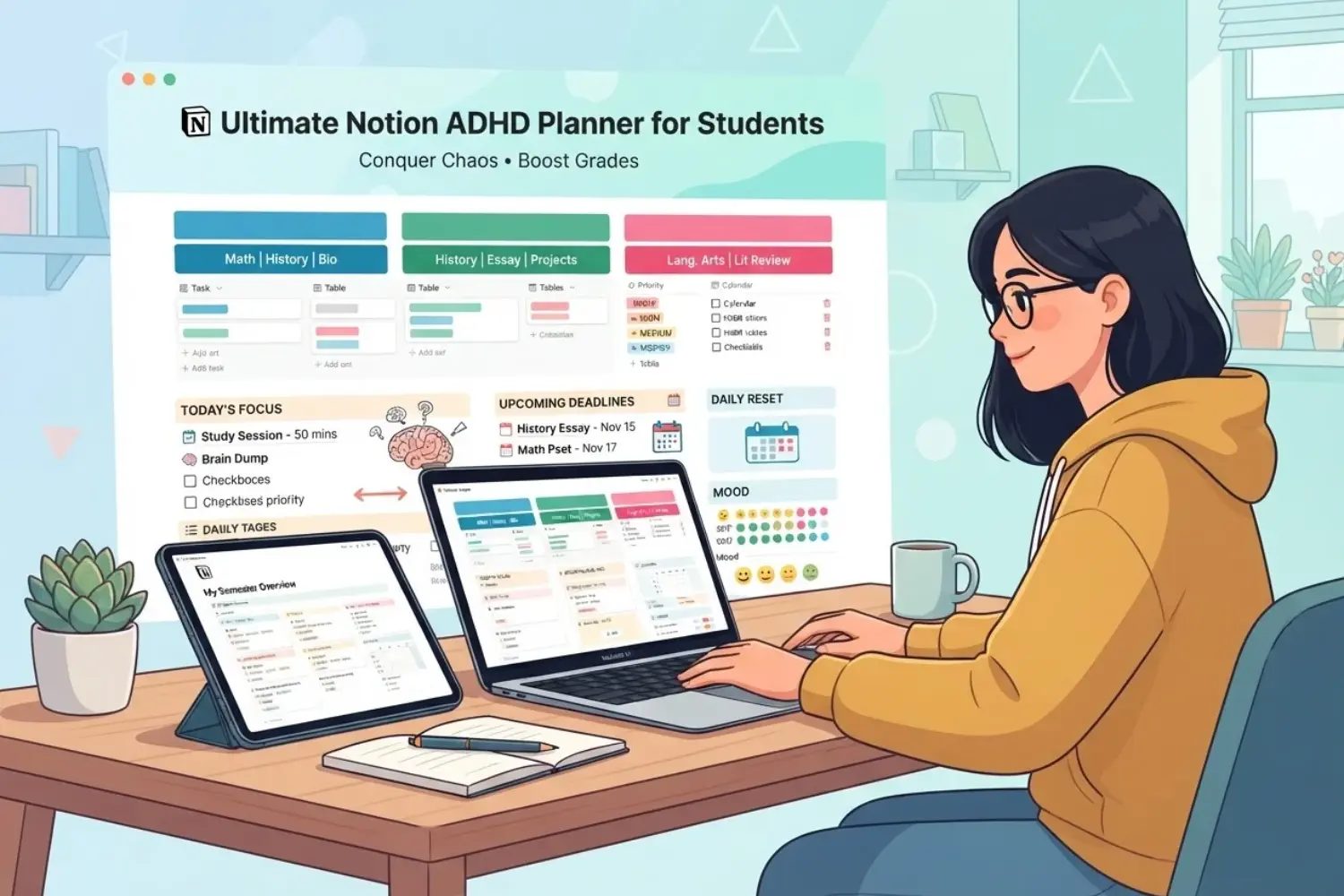
Visual dashboards do a lot of the heavy lifting. Instead of holding seven deadlines in your head, you can see them laid out on one screen: a board, a table, a calendar, whatever makes sense to you. Fewer decisions about where to look means less cognitive load and more room to actually start.
Linking is where Notion quietly shines. A lecture note can sit right next to the assignment it feeds into, and the readings that support it. When everything lives in one place, you stop losing twenty minutes hunting for the right document.
And the built-in calendar and due dates keep deadlines visible without adding another app to your plate. Your Notion ADHD Planner for Students becomes the single place you check, which is exactly the kind of simplicity ADHD brains thrive on.
Key ADHD‑Friendly Features to Leverage in Notion
One of the most powerful ways to stay on track is task management powered by Notion’s ‘first move’ prompts. These gentle nudges split a massive project into bite‑size actions, so you never feel stuck waiting for the next step.
Next, color‑coded subject blocks give instant visual cues, blue for math, green for history, so your brain can scan the page and know what belongs where. For those who struggle with overwhelm, a simple daily or sprint view lets you see only today’s priorities, keeping the list tidy.
Databases let you create collections for assignments, lecture notes, and reference links; tags make searching effortless and everything stays searchable. You can also attach a linked calendar so deadlines and class times appear automatically, reducing the chance of missing a due date.
A dedicated daily reset page offers quick habit notes and mood check‑ins, rounding out the system. Finally, minimalist layout options let you strip away clutter, leaving just essential widgets on your home dashboard. This clean design hides distractions and helps ADHD students focus on the work at hand. By weaving these features together, the Notion ADHD Planner for Students becomes an intuitive hub that turns chaos into clear progress.
Customizing Your Planner to Fit Your Unique Study Style
Your planner should feel like it was built for you, because it was. Start with color coding that matches how your brain categorizes information. Assign each subject a distinct hue, then layer in priority tags or mood indicators so you can scan the page and know exactly where to direct your energy.
A clean home dashboard keeps the noise down. Pin only the widgets you use every day — a focused task list, upcoming deadlines, and a quick link to your current project. Hide everything else behind toggles or linked pages so it stays accessible without crowding your view.
Connect a calendar that pulls in class times, work shifts, and personal appointments in one place. When your schedule lives beside your assignments, conflicts become obvious before they cause stress.
Build databases for assignments, readings, and reference links, then tag them by course, format, or effort level. Filtering by tag lets you pull up every reading for biology or every high‑effort task for the week in seconds.
Finally, add a daily reset page. Use it for a five‑minute review, habit tracking, and a quick mood check‑in. This small ritual closes the loop on today and sets a clear starting line for tomorrow, keeping your Notion ADHD Planner for Students aligned with your actual rhythm.
Holistic Support Beyond the Classroom with Notion
Your Notion space can do much more than track assignments. It becomes a full student operating system where academic work lives alongside personal errands, budgeting spreadsheets, and wellness logs. Having one place for everything means you don’t jump between apps or waste mental energy remembering where you put a bill or a workout goal.
Reflection pages give you room to process emotions, capture spontaneous ideas, or simply vent after a long day. Brainstorming pages too can hold project outlines, creative prompts, or even weekly goals without cluttering your task list. Ready‑made structures like Fayedtion’s ADHD Planner and Daily Reset templates provide a solid foundation you can tweak to match your rhythm.
They’re designed with the same flexibility that makes Notion so effective for focus challenges. By keeping everything in a single system, mental clutter drops and overall balance improves. Your Notion ADHD Planner for Students stops being just a study tool and becomes a trusted companion for daily life. When the workspace feels lighter, confidence grows and grades often follow.
Because the system adapts as you grow, you’ll find it easier to stay organized through every semester and beyond. Weekly reviews in your dashboard can surface what’s working and what needs tweaking, keeping the whole setup ADHD friendly.
Take Control with Your Personalized Notion ADHD Planner
Pick a template that feels close to how your brain works, then make it your own. Add pages for the subjects and routines that matter most, and remove anything that creates clutter. Your Notion ADHD Planner for Students should follow your energy, not fight it.
When a big assignment feels impossible, use the first move concept. Write down the tiniest next step, like opening a document or writing one sentence. That small action breaks the procrastination loop and builds momentum.
Set a regular review rhythm, maybe once a week, to simplify your setup. Delete unused databases, hide distracting widgets, and keep only what actually helps you focus. A lean system stays ADHD friendly because it reduces decision fatigue.
If you want a head start, explore Fayedtion’s summer reset and study planner templates. They offer ready made structures you can tweak to match your classes and personal goals.
Your Notion ADHD Planner for Students becomes more than a calendar. It becomes a tool for academic success and personal confidence.
Takeaway: Start simple, adjust often, and let your planner grow with you.