If it is not on the calendar, it does not get done.
That applies to blog posts, social media content, and especially email campaigns. Without a structured schedule, emails go out late, overlap with other sends, or get forgotten entirely.
An email marketing calendar template solves this by giving you a reusable framework to plan, schedule, and track every email you send. Instead of building a new calendar from scratch each quarter, you duplicate the template and start filling it in.
This article breaks down what an email marketing calendar template should include, why Notion is the best platform to build one, and how the Email Marketing Toolkit gives you a ready-made template that goes far beyond basic scheduling.
Table of Contents
What You’ll Learn
What Is an Email Marketing Calendar Template?
An email marketing calendar template is a pre-built, reusable calendar where you organize and schedule upcoming marketing emails. It standardizes how your email campaigns are planned so that every campaign follows the same structure.
A good template includes:
Campaign name and type (newsletter, promotional, welcome sequence, re-engagement)
Send date and time for each email
Target audience or segment receiving the email
Subject line and CTA for quick reference
Assignee or owner responsible for the email
Status tracking (draft, scheduled, sent, archived)
Goal alignment connecting each email to a business objective
Most teams start with a spreadsheet. Google Sheets or Excel can hold dates and campaign names, but they fall apart when you need to track performance, manage multi-step funnels, or run A/B tests. Spreadsheets are flat. They cannot link emails to campaigns, auto-calculate metrics, or give you a visual calendar view.
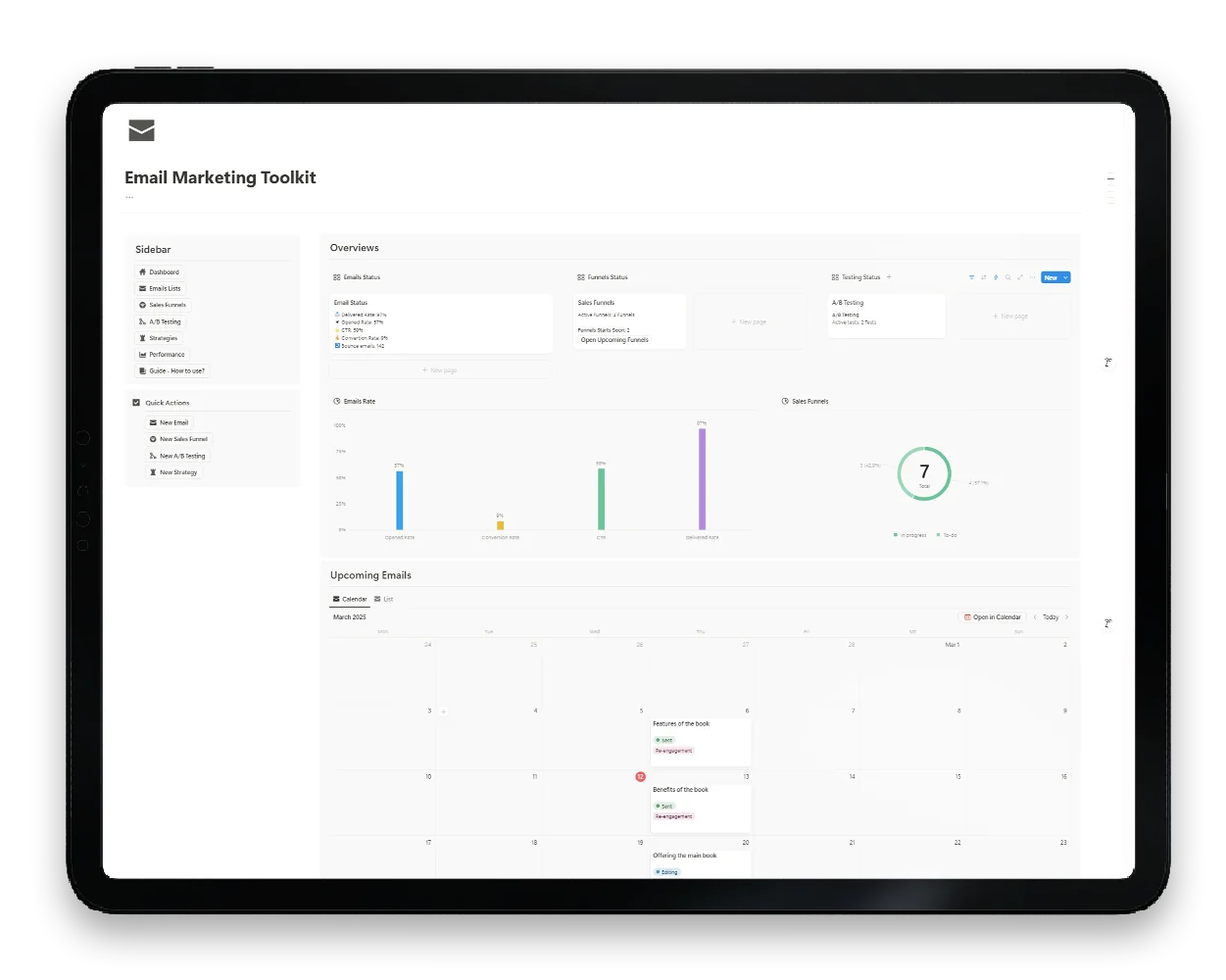
The Email Marketing Toolkit for Notion replaces spreadsheets with a connected template that handles scheduling, tracking, testing, and optimization in one workspace.
Why You Need an Email Marketing Calendar Template
Whether you are a solo creator or part of a marketing team, an email marketing calendar template provides structure that prevents common mistakes.
Prevent Email Overlap and Spam
Without a shared calendar, different campaigns can accidentally target the same audience on the same day. A template makes every scheduled email visible so you can spot conflicts before they happen.
Maintain Consistent Sending Rhythm
Subscribers respond to predictability. An email marketing calendar template helps you maintain a steady cadence (weekly newsletters, monthly promotions, seasonal campaigns) instead of sending emails randomly.
Standardize Your Workflow
A template ensures that every email follows the same planning process: define the goal, write the content, set the audience, schedule the send, track the results. This consistency improves quality and saves time.
Coordinate Across Campaigns
If you run multiple campaigns simultaneously (a welcome sequence, a product launch funnel, and a weekly newsletter), the calendar shows how they overlap and interact. You can adjust timing to avoid subscriber fatigue.
Track What Works
When performance metrics live alongside your schedule, patterns become visible. You can see which send days, subject lines, and content types consistently perform best.
Static vs. Dynamic Email Marketing Calendar Templates
Not all email marketing calendar templates are created equal. The platform you choose determines what your calendar can do.
Static Templates (Google Sheets / Excel)
What they can do:
Display dates and campaign names in a grid
Basic color-coding for different email types
Simple sharing via link or export
What they cannot do:
Auto-calculate performance metrics
Link emails to campaigns or sales funnels
Provide a visual calendar with drag-and-drop scheduling
Run A/B test tracking with winner identification
Connect to other databases (audiences, templates, analytics)
Relational databases that connect emails to campaigns, funnels, and A/B tests
Auto-calculated metrics (delivery rate, open rate, CTR, conversion rate)
Multiple views (calendar, table, board, timeline) of the same data
Drag-and-drop scheduling on the calendar view
Built-in checklists and guides on every email page
Sales funnel builder with stage-by-stage email tracking
A/B testing framework for subject lines, CTAs, images, buttons, and layouts
Multi-platform support for tracking emails across different ESPs
The difference is clear. A spreadsheet tells you when an email is scheduled. The Email Marketing Toolkit tells you when it is scheduled, how it performed, what you tested, and how it connects to your broader strategy.
Elevate Your Affiliate Business with Expert Insight Management
Take control of your affiliate marketing with our comprehensive Notion template. Designed for efficiency and clarity, this template helps you manage your affiliate programs, track earnings, and optimize your strategies.
CTA link — the action you want subscribers to take
Target audience — which segment receives the email
Topic — the main theme or content focus
Content draft — space to write and iterate before sending
4. Performance Metrics
Emails sent and delivered
Opens and open rate (auto-calculated)
Clicks and click-through rate (auto-calculated)
Conversions and conversion rate
Bounces and unsubscribes
5. Strategic Connections
Campaign link — which larger campaign this email belongs to
Funnel position — where this email sits in a sales sequence
A/B test link — if this email is part of a test
Goal — the business objective this email supports
The Email Marketing Toolkit includes all of these fields pre-built into every email entry. You do not need to set up columns or formulas. Open the template, create a new email, and start filling in the details.
How to Use the Email Marketing Calendar Template in Notion
Here is a step-by-step walkthrough of setting up and using the email marketing calendar template from the Email Marketing Toolkit.
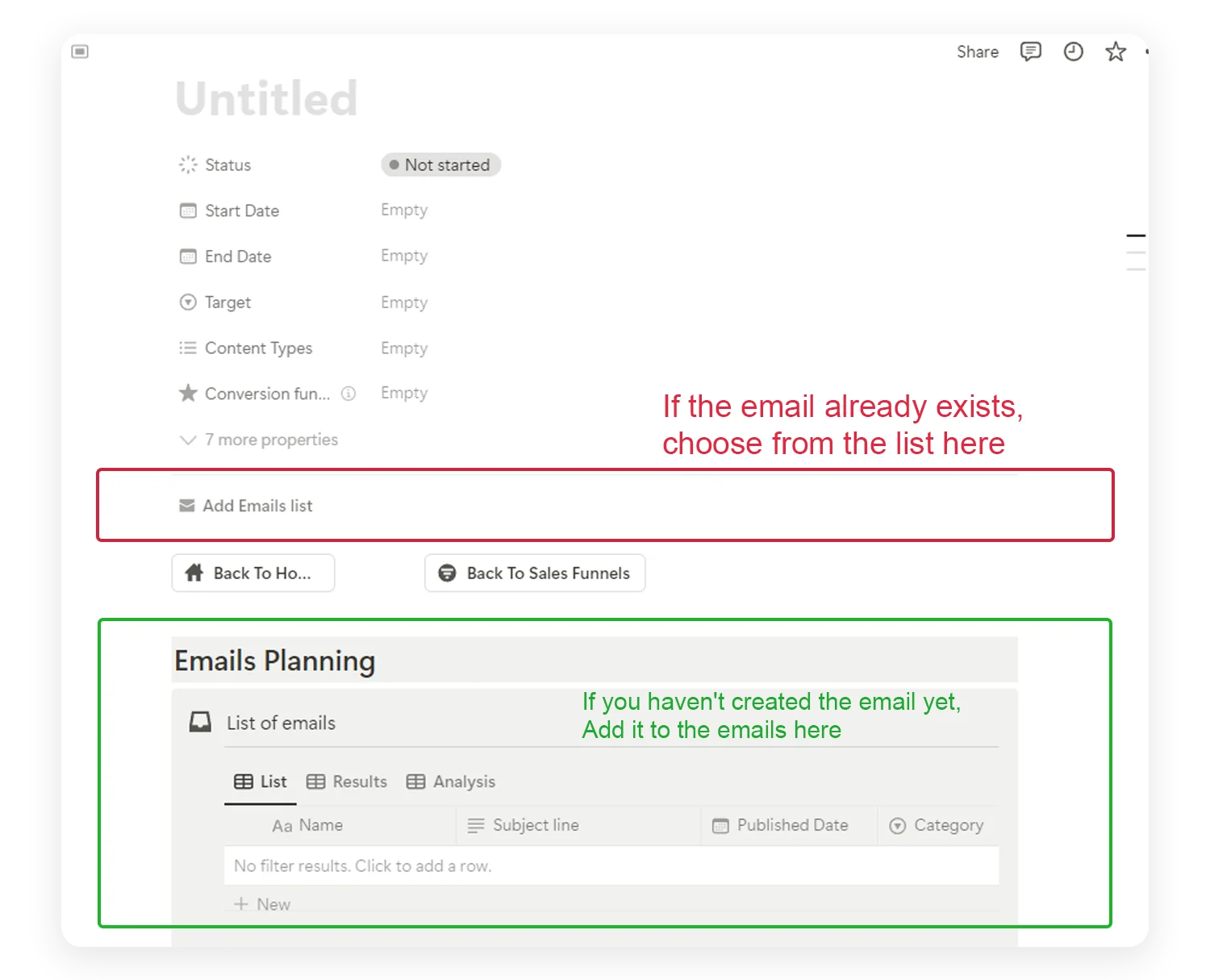
Step 1: Open the Email List
The Email List is the core of your email marketing calendar template. It contains every email you plan, send, and track. You can view it as:
Table view — see all properties at a glance
Calendar view — visual scheduling by date
Board view — organize by status (draft, scheduled, sent)
Switch between views depending on what you need. Use the calendar for scheduling, the table for detailed review, and the board for workflow management.
Step 2: Create Your First Email Entry
Click “New Email” to add an entry. Fill in the properties:
Name — give the email a descriptive title (e.g., “March Newsletter: Spring Tips”)
Type — standalone or drip campaign
Category — select from newsletter, promotional, sales funnel, etc.
Subject line — write the hook
Target audience — define who receives this email
Schedule date — set when it sends
Status — mark as Draft
Every email page includes a built-in checklist that walks you through: verifying links, testing subject lines, checking spam triggers, and aligning content with your strategy.
Step 3: Schedule on the Calendar
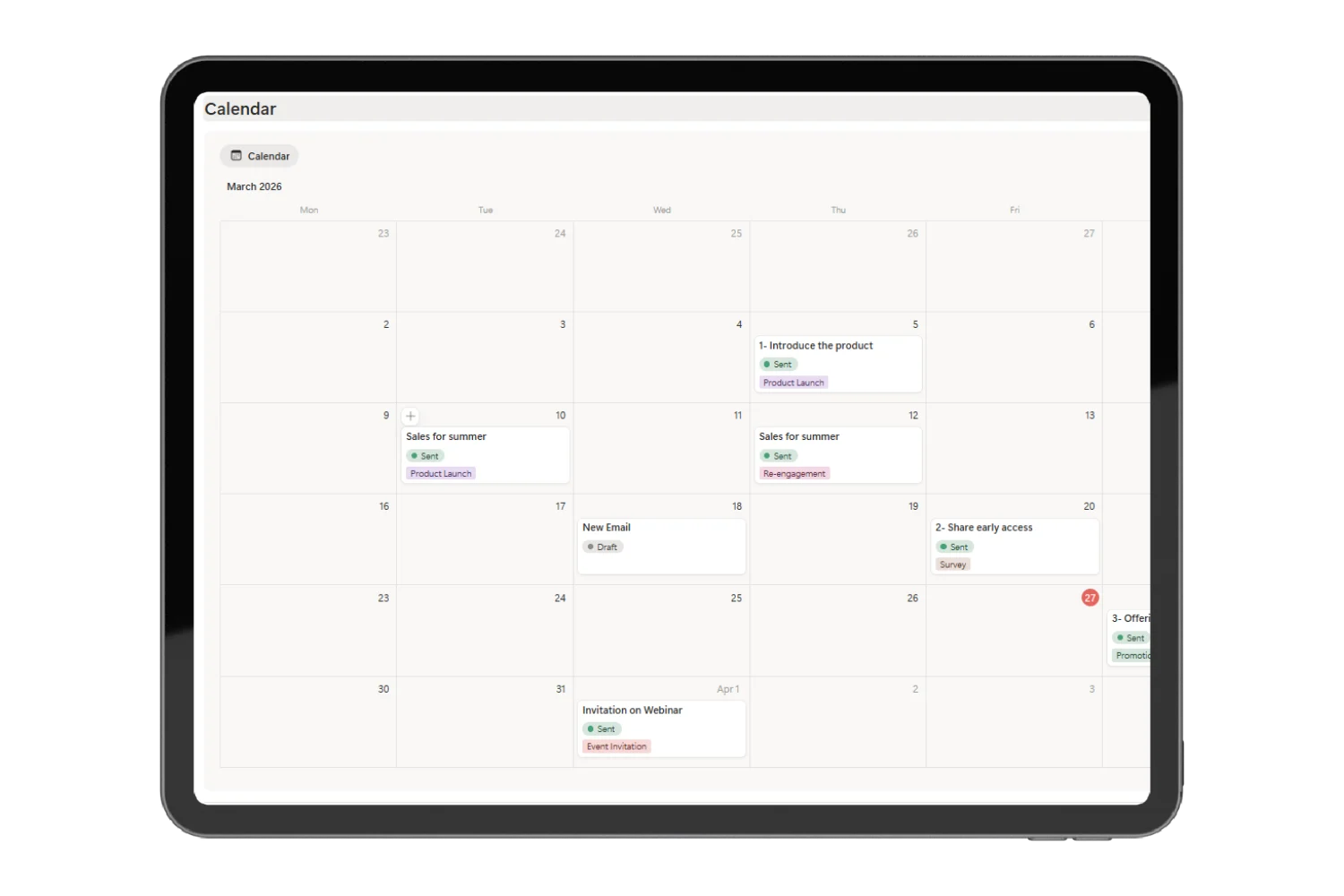
Switch to the email marketing calendar view to see your emails mapped across dates. Drag and drop entries to reschedule. Color-coding by category makes it easy to see the balance between newsletters, promotions, and engagement emails.
This visual approach prevents:
Sending multiple emails on the same day
Gaps of several days with no communication
Clustering promotional emails without value content in between
Step 4: Link Emails to Campaigns and Funnels
The toolkit goes beyond basic scheduling. You can:
Link emails to campaigns — group related emails under a single campaign
Build sales funnels — create step-by-step email sequences with defined objectives (increase sales, gain subscribers, brand awareness, lead generation)
Track funnel progress — see which funnel emails are drafted, scheduled, or sent
This relational structure is impossible in spreadsheets. It is what makes the Notion email marketing calendar template a genuine planning system instead of just a schedule.
📌 Screenshot Placement #7: Insert a screenshot of a Sales Funnel page showing linked emails with status indicators and funnel stages.
Step 5: Run A/B Tests
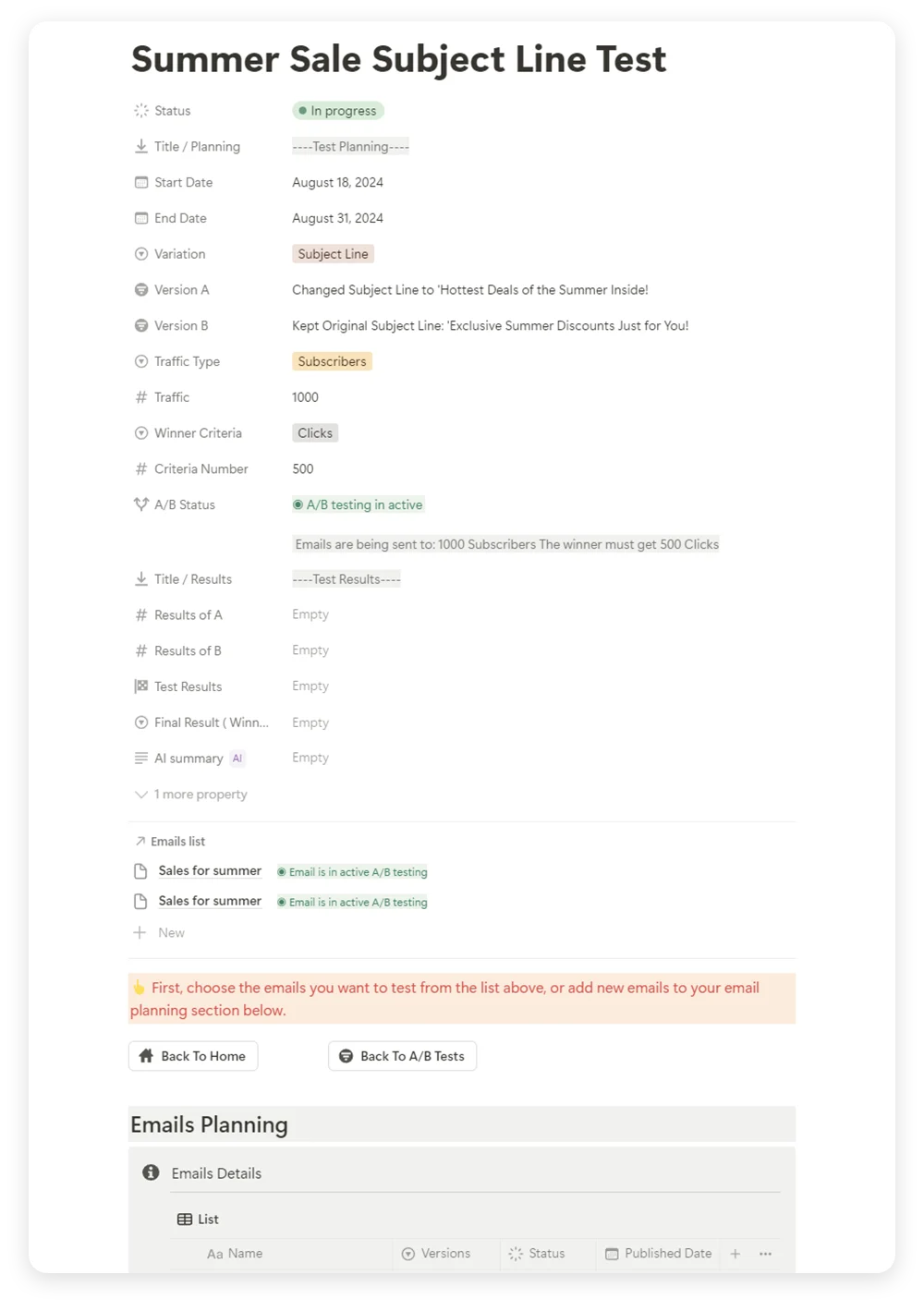
The toolkit includes a dedicated A/B testing framework. Test any element of your emails:
Subject lines
CTA buttons (color, text, placement)
Images and visual content
Email layouts and content structure
Send times and days
For each test, you define the variations, set the audience size and traffic split, choose the winner criteria, and record results. The toolkit auto-identifies the winner based on your defined metrics.
Step 6: Track Performance After Sending
After each email is sent, update the performance fields:
Emails sent and delivered
Opens, clicks, and conversions
Bounces and unsubscribes
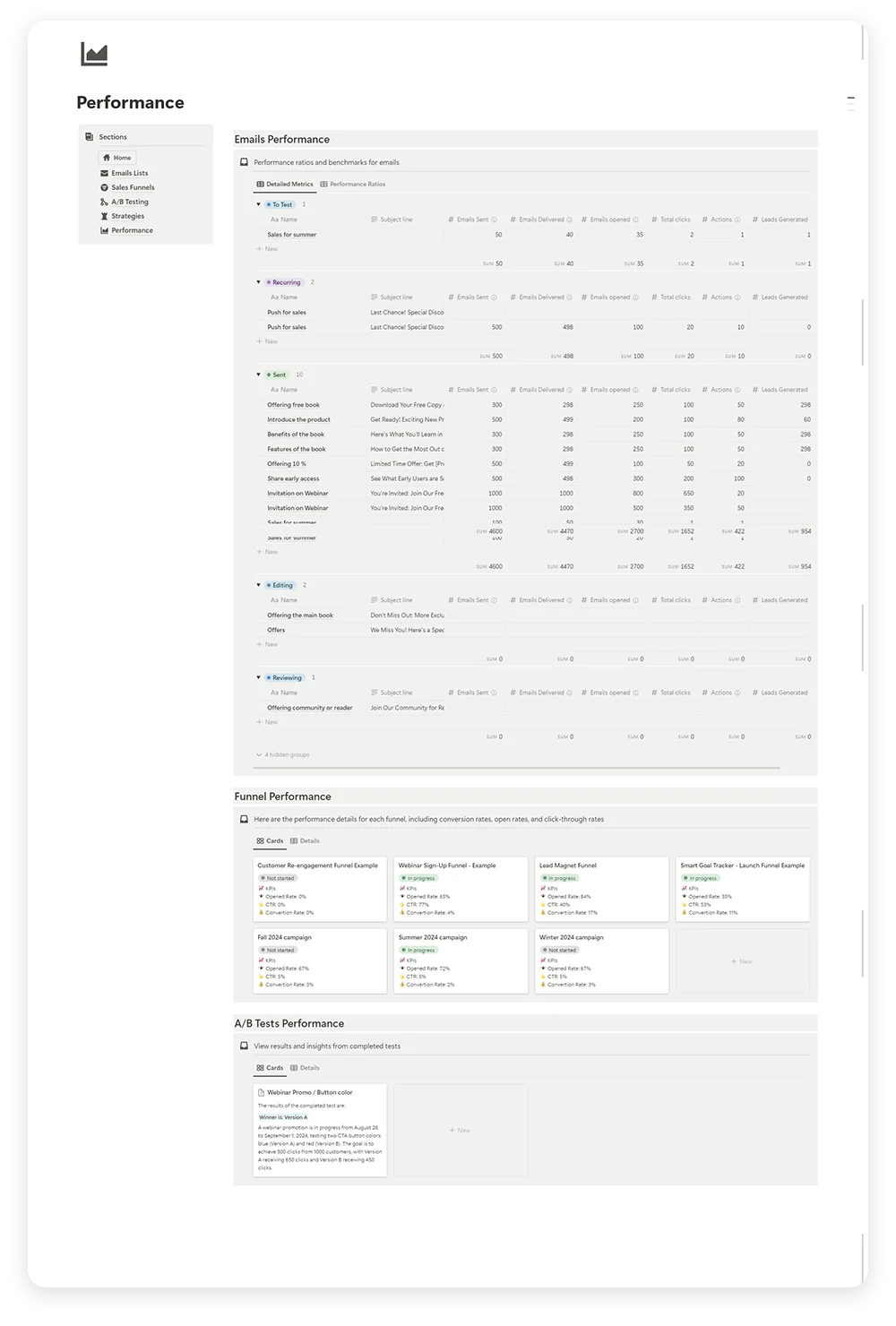
The toolkit auto-calculates delivery rate, open rate, and click-through rate. The Performance Page aggregates data across all emails so you can compare results, identify trends, and optimize future sends.
Email Marketing Calendar Template Examples
Here is how different use cases look inside the template:
Example 1: Weekly Newsletter Schedule
Week
Email
Category
Status
Week 1
March Tips Roundup
Newsletter
Sent
Week 2
New Template Launch
Promotional
Sent
Week 3
Behind the Scenes: How I Build Templates
Newsletter
Scheduled
Week 4
Monthly Performance Recap
Newsletter
Draft
Example 2: Product Launch Funnel
Day 1: Teaser email — “Something new is coming”
Day 3: Value email — “The problem this solves”
Day 5: Launch email — “It is live! Get it here”
Day 7: Social proof — “Here is what early users are saying”
Day 10: Last chance — “48 hours left at launch price”
Week 2: Early access — exclusive offer for subscribers
Black Friday: Main sale email + reminder
Cyber Monday: Extended deal announcement
Week 4: Thank you + post-sale engagement
All these examples work inside the template. Each email gets its own entry with full tracking, and the email marketing calendar view shows the complete picture.
Why Notion Beats Other Platforms for Email Marketing Calendars
Here is how the Notion email marketing calendar template compares to alternatives:
Notion vs. Google Sheets
Google Sheets gives you rows and columns. Notion gives you a connected database with calendar views, relational links, formula calculations, and rich content pages for each email. Sheets cannot build funnels, run A/B test tracking, or auto-calculate metrics.
Notion vs. Asana / Project Management Tools
Project management tools are designed for task tracking, not email marketing. They lack email-specific fields (subject lines, open rates, CTR), built-in A/B testing, and sales funnel logic. You end up forcing a general tool to do a specialized job.
Notion vs. ESP Built-in Calendars
Email service providers focus on sending, not planning. Their calendars show what was sent, but they do not help you plan content themes, coordinate across platforms, or compare performance across campaigns in a strategic view. Plus, if you use multiple ESPs, each one has its own isolated calendar.
The Email Marketing Toolkit centralizes everything. Plan in one workspace regardless of which ESP you use for sending.
Email Marketing Calendar Best Practices
Plan at Least Two Weeks Ahead
Reactive email marketing produces weaker results. Planning ahead gives you time to craft better subject lines, design stronger CTAs, and align sends with business events.
Balance Value and Promotion
Follow the 80/20 rule: 80% of your emails should deliver value (tips, insights, resources) and 20% should be promotional. Your email marketing calendar template makes this balance visible at a glance.
Review Performance Weekly
Spend 15 minutes each week reviewing the metrics from your recent sends. Look for patterns in open rates, click-through rates, and unsubscribes. Adjust your calendar based on what the data shows.
Segment Your Audience
Do not send the same email to everyone. Use the target audience field in your template to ensure each email reaches the right segment.
Test Before You Scale
Use A/B testing on small segments before rolling out to your full list. Test subject lines, send times, CTAs, and content formats. Let data guide your decisions.
Keep Subject Lines Under 50 Characters
Mobile devices truncate long subject lines. Keep them short, specific, and curiosity-driven. Track which styles perform best in your A/B testing log.
Clean Your Email List Regularly
Remove bounced addresses, inactive subscribers, and duplicates. A clean list improves deliverability and ensures your metrics reflect genuine engagement.
Everything Included in the Email Marketing Toolkit
The template comes ready to use with:
Email marketing calendar with drag-and-drop scheduling and multiple views
Email list database with full property tracking per email
Sales funnel builder for multi-step email sequences
Multi-platform support for tracking across ConvertKit, Mailchimp, Gumroad, and more
Built-in checklists and guides on every email page
Pre-designed templates for quick email creation
Get Your Free Email Marketing Calendar Template
Stop planning emails in spreadsheets that cannot track performance or connect campaigns. The Email Marketing Toolkit gives you a professional email marketing calendar template built in Notion with everything you need to plan, execute, and optimize your email strategy.
Whether you are a solo creator sending weekly newsletters or a team coordinating multi-channel campaigns, this template keeps every email organized, scheduled, and tracked in one workspace.
Share:
Don't Miss Updates From Us
Sign up for our newsletter and never miss out on new templates, articles, and exclusive discounts!
Stay updated with new template releases and updates
Get exclusive offers and discounts
Receive valuable tips and content to boost your productivity
We value your privacy and promise to only send you relevant content you’ll love. Unsubscribe easily anytime.
Don't miss out! - Exclusive offer for you! - Save 30% on your purchase with code:
💬
Need help with Notion?
Ask your question directly in the Fayedtion Telegram group.