


A newsletter business in Notion is a single connected workspace where every ingredient of the operation ideas, drafts, subscribers, sponsors, and revenue lives inside linked databases instead of scattered across Substack analytics tabs, Airtable sponsor sheets, and Notion pages nobody opens twice. This playbook shows you the exact 6-database stack solopreneurs use to run a newsletter business in Notion as a real business, not a hobby.
Most creators start a newsletter with one tool (Kit, beehiiv, Substack) and hope revenue follows. It rarely does. The gap between a growing subscriber count and a working newsletter business in Notion is operational: nobody tracks which idea became which issue, which issue drove which sponsor conversation, and which sponsor paid what. Fix the operating layer once and every downstream number climbs.
By the end of this guide you have a working structure for 6 linked databases, a weekly operator rhythm, one custom AI agent that drafts issues from your idea bank, and 4 monetization layers wired directly into the workspace.
Table of Contents
What You’ll Learn
Why Most Newsletters Never Become Businesses
Three failure patterns show up on every solopreneur newsletter audit:
- Idea graveyard: ideas live in Apple Notes, Twitter bookmarks, and voice memos. Nothing ever gets pulled into an issue on purpose.
- Invisible sponsor pipeline: a sponsor reply sits in Gmail for 3 weeks because there is no CRM. The deal dies.
- Untracked revenue: sponsor payments, affiliate commissions, and product sales sit in 3 different dashboards. The operator has no idea which issue drives which dollar.
A connected newsletter business in Notion collapses all three into one queryable workspace. Every idea has a status. Every sponsor has a stage. Every dollar has a source issue.
The 6-Database Newsletter Business Stack
The operator stack for a newsletter business in Notion is six databases, each one owning one job. Keep them separate and linked, not merged.
1. Idea Bank (data source)
Properties: Idea (title), Angle, Hook, Source (URL or note), Status (Raw, Approved, Scheduled, Shipped, Retired), Score (formula), Tag (multi-select), Issue (relation to Editorial Calendar).
Every idea enters here first. The Score formula multiplies Hook Strength × Audience Fit × Effort Inverse so triage is one sort, not a debate.
2. Editorial Calendar (data source)
Properties: Issue Title, Send Date (date), Status (Draft, In Review, Ready, Sent), Idea (relation), Newsletter Body (text or child page), Word Count (formula), Subscriber Segment (multi-select), Sponsor Slot (relation to Sponsors CRM).
One row per issue. The Timeline view shows the next 8 weeks at a glance. The Calendar view is what you screenshot for sponsor pitches.
3. Subscribers Database (data source)
Properties: Email, Name, Signup Source (Landing Page, Referral, Twitter, Lead Magnet), Signup Date, Tags, Engagement Score (formula from Opens + Clicks), Lifecycle Stage (New, Active, At Risk, Cold), Notes.
This is not your sending list. Your ESP still handles delivery. This is the operator layer where you segment subscribers for launches, sponsor targeting, and re-engagement sequences. Sync via native Mailchimp, beehiiv, or Kit integrations or a scheduled export.
4. Sponsors CRM (data source)
Properties: Company, Contact, Email, Deal Stage (Prospect, Pitched, Negotiating, Booked, Sent, Paid), Rate, Slot Date (relation to Editorial Calendar), Vertical, Notes, Next Action (date).
Every sponsor conversation lives here. Kanban view grouped by Deal Stage becomes your weekly pipeline check. No sponsor deal ever dies in Gmail again.
5. Revenue Ledger (data source)
Properties: Entry Date, Amount, Source (Sponsor, Affiliate, Product, Paid Tier), Related Issue (relation), Related Sponsor (relation), Payment Status, Invoice Link.
One row per dollar in. A rollup on Editorial Calendar sums revenue per issue so you finally see which issues drove which paychecks. This is the number that separates a newsletter business in Notion from a newsletter side project.
6. Repurpose Queue (data source)
Properties: Source Issue (relation), Format (Twitter thread, LinkedIn post, YouTube short, blog post), Status (Queued, Drafted, Scheduled, Published), Publish Date, Distribution URL, Referral Signups (number).
Every issue you send gets 4-6 rows here. This is how one 800-word issue becomes 6 pieces of downstream content that pull subscribers back to the top of the funnel.
How the Databases Connect (Relations Map)
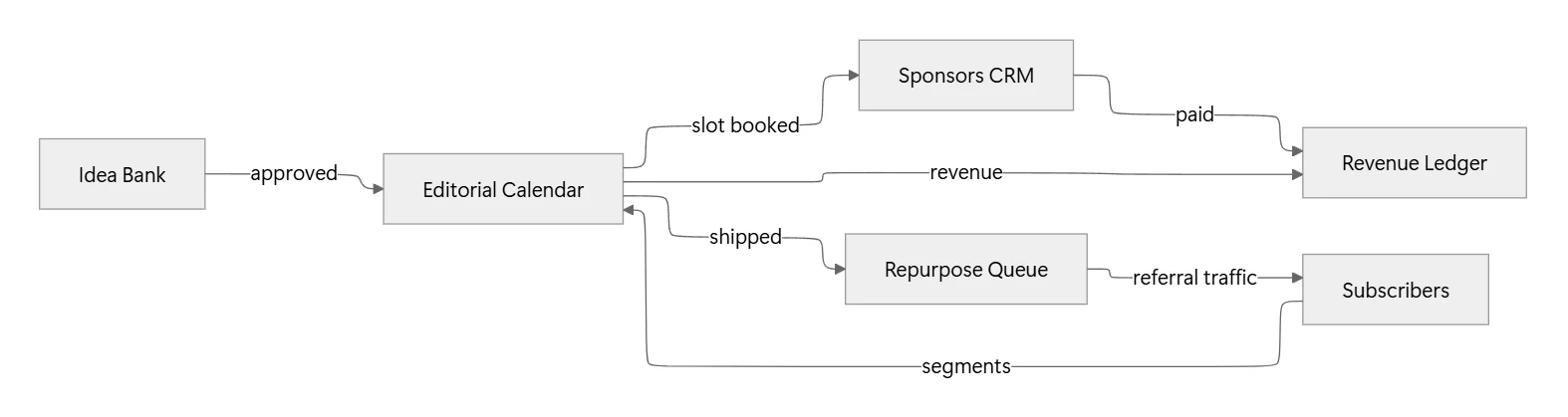
One idea flows into one issue. One issue books one sponsor slot, generates revenue rows, spawns repurpose rows, and pulls subscribers back in through distribution. Every database earns its keep.
The Weekly Newsletter Operator Rhythm
The stack sits idle without a schedule. Solopreneurs running a working newsletter business in Notion follow a five-day operator rhythm.
Monday: Idea Triage (30 minutes)
Open Idea Bank filtered to Status = Raw. Rank by Score. Approve the top idea for the week, set Status = Scheduled, create the linked Editorial Calendar row. Retire anything older than 30 days that never scored above 6.
Tuesday: Draft (90 minutes)
Open the Editorial Calendar row. Draft the issue directly in the Newsletter Body child page. Notion AI writes the first pass from the Idea Bank hook and your recent workspace notes.
Wednesday: Edit + Sponsor Slot (60 minutes)
Edit the draft. Open Sponsors CRM Kanban, drag the sponsor for this issue into Booked, link them to the Editorial Calendar row. Send the sponsor a preview screenshot of the calendar row so they see exactly where their placement lands.
Thursday: Send + Repurpose (45 minutes)
Export the final body into your ESP, send. Flip Editorial Calendar Status = Sent. Auto-generate 4-6 Repurpose Queue rows via a button that clones the issue title into each format.
Friday: Review Metrics (30 minutes)
Sync ESP open and click rates into the Editorial Calendar row. Rollup the week: revenue per issue, new subscribers per source, sponsor pipeline movement. Adjust next week’s slot based on the numbers.
Four hours total. That is the whole operator week.
Custom Agent: “Newsletter Draft Machine”
A custom Notion AI agent trained on your workspace turns Tuesday’s 90-minute draft into a 20-minute edit pass.
Trigger: Database row created in Editorial Calendar with Status = Draft.
Instructions given to the agent:
- Read the linked Idea Bank row for Hook, Angle, and Source.
- Pull the last 3 issues from Editorial Calendar to match voice and format.
- Draft an 800-word issue: cold open (2 lines), main body with one story and one framework, closing CTA linking to the current sponsor row or affiliate product.
- Return the draft in the Newsletter Body child page. Do not send.
Connections: Notion workspace. No external ESP connection needed at this stage.
Cost: 4-6 credits per draft on Sonnet 4.6. At 300 free monthly credits per workspace you get 50-70 free drafts before you hit paid usage. Once you monetize, the $10 per 1,000 credits cost sits under 1% of a $150 sponsor slot.
Monetization Layers Solopreneurs Actually Ship
A newsletter business in Notion is not one revenue stream. It is four, and Revenue Ledger tracks each one against the issue that drove it.
1. Sponsorships
Direct placements in the newsletter body. Rate scales with active subscriber count and open rate. A 5,000-subscriber newsletter with a 40% open rate lands $150-400 per slot on average. Sponsors CRM Kanban board is your entire pipeline.
2. Affiliate Placements
Product recommendations inside issues with tagged UTM links. Every click flows to the Affiliate Link Hub, every commission back to Revenue Ledger via a Related Issue rollup. Highest ROI when you recommend one tool per issue with a genuine use case.
3. Digital Products
One Notion template, one ebook, one course. Sell to your list first because subscribers convert 5-10× warmer than cold traffic. Revenue Ledger source column shows exactly which issue converted which buyer.
4. Paid Tier
MemberSpace, Stripe, or your ESP’s paid subscription feature gates premium issues. Subscribers Database Lifecycle column marks paid members so you segment sends accordingly.
Stack these in this order. Sponsorships are the fastest to a first $500. Affiliates compound. Products give you asset value. Paid tier gives you recurring floor.
Skip the 3-Hour Setup With These Templates
Building this from scratch takes 3-4 hours across 6 databases plus relations, formulas, and views. These six Published templates cut it to 25 minutes. Pick based on where you are today.
If you have zero systems yet, start at the foundation:
- Notion Starter Pack: The base workspace scaffolding with pre-wired Tasks, Notes, and CRM primitives every other template sits on top of. Install this first or the operator stack has nowhere to plug in.
For the newsletter operator core (the 6-database stack itself):
- Newsletter Growth & Monetization OS: The core operator engine. Idea Bank, Editorial Calendar, Subscribers, Sponsors CRM, and Revenue Ledger arrive pre-connected with the relations map already wired. Drop it in and you skip the entire setup diagram from earlier in this guide.
- Email Marketing Toolkit: The email delivery and sequence layer. Welcome sequence, re-engagement flow, and subject-line library ready to paste into your ESP. Pairs with the operator OS by feeding into the Subscribers Database via source tags.
For growth, automation, and monetization:
- Content Repurposing OS: Turns each shipped issue into 4-6 downstream posts across Twitter, LinkedIn, YouTube shorts, and blog. Wires directly into the Repurpose Queue database.
- Workflow & Automation OS: The custom agent scaffolding for the Newsletter Draft Machine described above. Includes the trigger config, permissions map, and cost estimator so you deploy the agent in under 15 minutes.
- Affiliate Link Hub + UTM Builder: The revenue side. UTM Builder generates trackable affiliate and sponsor links tied to specific issues. Links flow back into Revenue Ledger via the Related Issue relation.
FAQ
Do I need to leave Substack or beehiiv to run a newsletter business in Notion?
No. Notion is the operator layer, not the sender. Your ESP still delivers. You keep Substack, beehiiv, Kit, or Mailchimp for sending and use the 6-database stack for ideas, sponsors, revenue, and repurpose. Best of both worlds.
How many subscribers before this stack pays off?
Zero. The stack pays off on day one because it prevents the idea graveyard and sponsor Gmail death. By the time you cross 1,000 subscribers you already have a booked sponsor pipeline instead of scrambling.
What if I already have separate tools for sponsors and revenue?
Consolidate. Every hour spent switching between Airtable, Google Sheets, and a CRM is an hour not writing. Migrate one database per week and delete the source tool once the Notion version is live for 14 days.
How much time does the weekly rhythm take?
Around 4 hours end-to-end for one weekly issue: 30 min triage, 90 min draft, 60 min edit and sponsor slot, 45 min send and repurpose, 30 min metrics. Custom agents pull draft time down to 20 minutes once trained.
Do I need Notion AI credits to run this?
Only if you use the custom agent for drafting. The 6-database stack works without any AI. The 300 free monthly workspace credits cover 50-70 agent-drafted issues before you touch paid usage at $10 per 1,000 credits.
Turn Your Newsletter Into a Real Business This Month
A newsletter business in Notion is not another content system. It is the operator OS that turns a growing subscriber count into revenue you actually see, from sponsors you actually close, on issues you actually ship on schedule. The gap between 500 subscribers and $2,000 monthly is not audience size. It is operational density.
Install the 6-database stack this week. Load 20 ideas into the Idea Bank on day one. Book your first sponsor slot in the Sponsors CRM by day seven. By the end of month one, Revenue Ledger tells you exactly which issue drove your first paid placement. Run the weekly operator rhythm for 90 days and the newsletter business in Notion stops being a template and starts being a business you own.
