

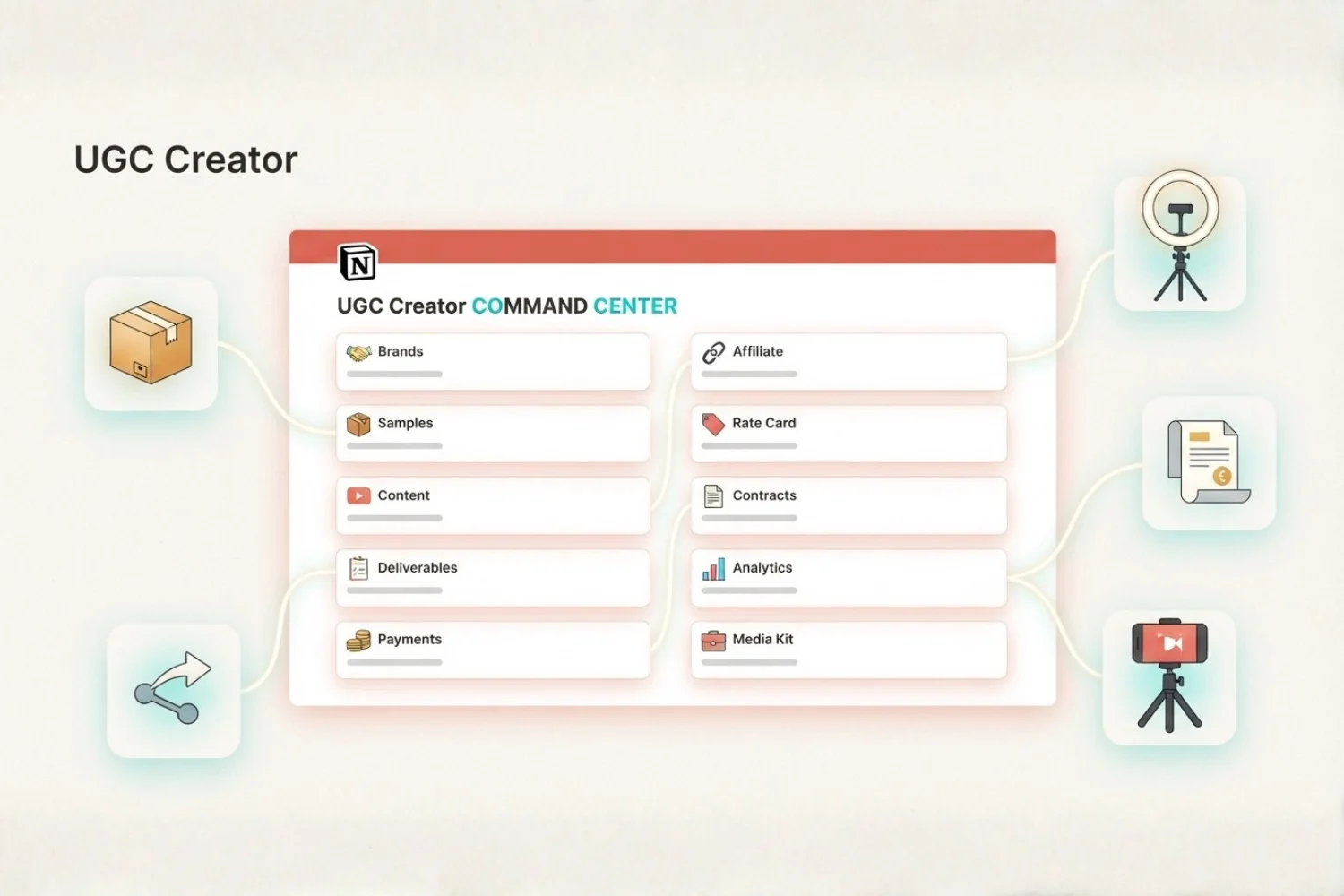
Your brand deals live in your inbox. Your samples live in a drawer. Your invoices live in your head. Every UGC creator hits this wall around deal number three, when a shoot deadline slips past a sample’s expiration date and a brand asks where the video is.
Solo UGC creators start on scrappy tools. Inbox for deal negotiation. Notes app for shoot ideas. Calendar for deadlines. Spreadsheet for payments. Camera roll for finished videos. The stack works for the first two deals. By deal five, follow-ups get missed, samples expire in cardboard boxes, and revenue by brand stays a mystery.
A UGC creator Notion template closes the gap. This guide walks through what one is, the ten workflows every creator operation needs, and how to build the full system inside UGC Creator OS.
Table of Contents
What You’ll Learn
What Is a UGC Creator Notion Template?
A UGC creator Notion template is a connected workspace holding every moving part of a paid content operation. Brand deals, product samples, content pipeline, deliverables, payments, affiliate income, rate card, contracts, analytics, and a public media kit sit in one place with two-way relations. Open a brand and every linked sample, video, invoice, and contract shows up on the same page.
This is a different shape from a generic CRM or content planner. A generic CRM tracks contacts. A generic content planner tracks posts. A UGC-focused Notion template tracks the full deal lifecycle: outreach, sample shipment, shoot, revision, delivery, invoice, payment, affiliate payout, portfolio entry.
Why the Multi-App Stack Breaks
The typical stack looks like this:
- Inbox for brand outreach and negotiation
- A spreadsheet for pipeline status
- Camera roll or Google Drive for raw footage
- Notes app for scripts and shoot briefs
- PayPal or Stripe for invoicing
- Google Sites or Beacons for a public media kit
Each tool knows part of the story. None of them talks to the others. A sample sitting in a drawer forgets which brand shipped it. An affiliate payout does not know which video drove the sale. Usage rights on a contract get buried in a signed PDF nobody opens again.
The 10 Connected Workflows Every UGC Creator Needs
UGC Creator OS ships with ten linked databases. Here is what each one owns.
1. Brands CRM
The hub. One page per brand, from cold outreach through repeat client. Set the platform (Amazon, TikTok Shop, DTC, Retail, Agency), the deal type (Paid UGC, Gifted, Affiliate, Hybrid), and the status (Prospect, Outreach Sent, Negotiating, Won, Delivered, Paid, Archived). Rollups on this page auto-count linked samples, active videos, open invoices, and lifetime revenue per brand.
2. Samples
Every physical product a creator receives, tagged by brand. Shipping tracking, arrival date, shoot deadline, expiration date, and status (Requested, In Transit, Received, Shot, Returned, Expired). One row per box. Sample-to-shoot lag surfaces the operational bottleneck instantly.
3. Content Pipeline
Every video from idea to posted. Type (Product Demo, Testimonial, Unboxing, Tutorial, Get Ready With Me, Comparison), format (TikTok, Reel, YouTube Short, Amazon Video, Long-Form), and status (Idea, Scripted, Shot, Editing, Approved, Posted, Archived). Deadline flags surface anything at risk of missing a brand delivery date.
4. Deliverables & Revisions
The version tracker. Each video gets a deliverable row with brand approval status, revision count, and file link. Round 1, Round 2, Round 3, Final. Two revisions is the ceiling on most contracts. This layer tracks whether a creator has hit it.
5. Payments
Every invoice with amount, currency, due date, payment method (Stripe, PayPal, Wise, Bank Transfer), and payment status (Draft, Sent, Overdue, Paid). Rollups by brand and by month show what is booked, invoiced, and collected. Overdue invoices get flagged red on the dashboard.
6. Affiliate Revenue
Every affiliate program tagged by platform (Amazon Influencer, TikTok Shop, LTK, ShareASale, direct). Commission percentage, tracking link, and a net-after-platform-cut formula strip out the platform fee so profit per program shows against real effort.
7. Rate Card
A creator’s standard pricing per format and per usage window. Product Demo (30 sec) at one rate, Testimonial (60 sec) at another, Whitelisting fee, Usage rights fee. This layer feeds the media kit and answers brand rate requests in under a minute.
8. Contracts & Usage Rights
Every signed agreement with the brand, deal, usage window (30 days, 90 days, 6 months, 12 months, perpetual), platforms covered, and exclusivity clauses. Auto-flags when usage rights are about to expire so a creator does not leave content live past the contract.
9. Analytics
Views, likes, saves, and comment counts per posted video, tagged by brand and platform. Best-performing hooks, formats, and product categories bubble up in a table view. This is what a creator brings to a rate negotiation.
10. Media Kit
A public page pulling from Rate Card, Analytics, and highlight reel entries. One share link goes out to every prospect brand. No PDF, no dead attachment, no version drift.
How to Build the Full Creator OS in Notion
Four steps to stand up a UGC creator Notion template.
Step 1: Set Up the Brands Database First
Every other database points at Brands. Build this one first with these properties:
- Title (Brand Name)
- Multi-select (Platform)
- Select (Deal Type)
- Status (Prospect, Outreach Sent, Negotiating, Won, Delivered, Paid, Archived)
- Date (First Contact, Last Contact)
- URL (Website, Contact Email)
Leave the rollups blank for now. Add them after the other databases exist.
Step 2: Add the Nine Linked Databases
Build Samples, Content, Deliverables, Payments, Affiliate, Rate Card, Contracts, Analytics, and Media Kit. For each one, add a Relation property pointing at Brands. This wires the graph.
Once the relations exist, open Brands and add rollup properties: Active Samples, Open Invoices, Lifetime Revenue, Posted Videos. The dashboard updates itself.
Step 3: Build the Workflow Pages
The magic is not the databases. It is the pages filtering them for a single job. Build these:
- Deal Board: Brands by Status (kanban) + Overdue Follow-ups (table)
- Sample Triage: Samples by Status (board) + Expiring This Week (filter)
- Content Pipeline: Videos by Status (kanban) + Timeline by Deadline
- Money: Payments by Status + Affiliate Revenue by Platform (charts)
- Portfolio: Analytics filtered to Top 20 by Views
- Public Media Kit: Sharable page with Rate Card + Highlight Reel + Analytics summary
Step 4: Add Templates, Forms, and Rollups
Templates save minutes on every new record. Ship five Content templates (Product Demo, Testimonial, Unboxing, Tutorial, GRWM), three Brand templates (Cold Outreach, Warm Referral, Repeat Client), and one Invoice template with pre-filled tax lines.
Forms turn the workspace into a receiving desk. A Quick Add form on Samples turns tracking emails into database rows in under 30 seconds. A public Contact form on the Media Kit page routes brand inquiries directly to the Brands database as a Prospect row.
Or skip the build entirely. UGC Creator OS ships every workflow, page, template, and form pre-built. Launch price is $29 (regular $39).
3 UGC Setups Ranked by Volume
Beginner Creator (0-5 deals, 1-2 platforms)
| Layer | Setup |
|---|---|
| Brands | 5-10 rows, mostly Prospect and Outreach Sent |
| Samples | Received + Shot statuses only |
| Content | Idea, Scripted, Shot, Posted |
| Deliverables | Skip until first paid deal |
| Payments | Invoice + Paid statuses, no automation |
| Affiliate | Amazon Influencer only |
| Rate Card | Two rates: 30 sec and 60 sec |
| Contracts | Skip until first $500 deal |
| Analytics | Views and saves only |
| Media Kit | One share link |
Full-Time Creator (10-30 deals, 2-4 platforms)
| Layer | Setup |
|---|---|
| Brands | Full pipeline, weekly review |
| Samples | Every status active, expiration flags on |
| Content | Full pipeline with revision loop |
| Deliverables | Round 1, Round 2, Final tracked |
| Payments | Overdue flagging on |
| Affiliate | 3-5 programs tagged and reconciled |
| Rate Card | Format + usage window pricing |
| Contracts | Every deal signed, usage window logged |
| Analytics | Weekly review of top posts |
| Media Kit | Public page with rate card and highlights |
Multi-Platform Creator (30+ deals, agencies + direct)
| Layer | Setup |
|---|---|
| Brands | Segmented by Direct vs Agency source |
| Samples | Board by expiration date, weekly triage |
| Content | Kanban by platform, format filter |
| Deliverables | Revision counter with contract ceiling flag |
| Payments | Overdue by brand, aging report by month |
| Affiliate | Every program net-after-fees, cross-program compare |
| Rate Card | Tiered by follower count and usage window |
| Contracts | Exclusivity clauses tracked across brands |
| Analytics | Cross-platform ROI per format |
| Media Kit | Multiple share links per brand vertical |
How to Pick the Right Setup
Pick by the layer hurting most.
- If brand emails go weeks without a reply: start with Brands and a Deal Board.
- If a sample expired in a drawer before the shoot: start with Samples and an expiration filter.
- If a brand asked for a rate and you scrambled for 20 minutes: start with Rate Card and Media Kit.
- If revenue by platform is a mystery: start with Payments and Affiliate Revenue.
Beginners build in this order. Full-timers build all ten layers at once because next quarter’s revenue depends on it.
Common Mistakes
- Skipping the Brands hub. Every other database needs a brand to link to. Building Samples first leaves a pile of boxes with no owner.
- Ignoring sample expiration dates. A skincare sample expired in shipping means the shoot never happens and the deal dies.
- No revision counter on Deliverables. Round 4 revisions on a two-revision contract is unpaid labor.
- Filing gifted deals as paid. Gifted-only deals with no cash component skew the revenue view.
- A media kit as a PDF. PDFs go stale the day they are made. A live Notion page pulls current numbers.
- Usage rights buried in signed PDFs. A brand keeps running the video past the contract window and the creator never notices.
Metrics Cheat Sheet
| Metric | Where it lives | What to watch |
|---|---|---|
| Reply rate on outreach | Brands view | Below 15% signals cold-email fatigue |
| Sample-to-shoot lag | Samples rollup | Above 14 days signals workflow drag |
| Revision rounds per deal | Deliverables view | Above 2 signals brief clarity issues |
| Overdue invoices | Payments filter | Above 30 days signals collection risk |
| Affiliate net vs gross | Affiliate formula | Compare platform take across programs |
| Views per posted video | Analytics view | Below platform average signals hook issues |
Who This Guide Is For
- Solo UGC creators making paid product videos
- Amazon Influencer Program participants running storefronts and paid content
- TikTok Shop creators running affiliate and paid deals in parallel
- DTC creator partners with recurring brand relationships
- Small creator teams (creator + editor + manager) tracking 5+ brand deals in parallel
- Anyone tired of losing brand emails, samples, or payouts between apps
When to Build Your First Creator OS
Build the system before deal number three. The migration cost triples after the first pipeline of five active brands. Sample tracking goes from a mental checklist to a lost box. Revision counts get miscounted. Overdue invoices sit for two months before anyone notices.
If deals are already active, build the OS this week. Backfill Brands and current Samples today. Backfill open invoices from inbox threads over the weekend. Backfill posted videos and analytics from the last quarter. Backfill contracts from signed PDFs.
FAQ
What is a UGC creator Notion template?
A UGC creator Notion template is a connected workspace holding brands, samples, content, deliverables, payments, affiliate revenue, rate card, contracts, analytics, and a media kit in linked databases. Open one record and every related item across the graph surfaces on the same page.
What should a brand deal tracker Notion template include?
A brand deal tracker Notion template needs a Brands CRM at the core with Deal Status, Deal Type, and Platform properties. It links to Samples, Content, Deliverables, Payments, and Contracts. Rollups on the brand page auto-count active deals, open invoices, and lifetime revenue.
Is an influencer CRM template better than a spreadsheet?
An influencer CRM template beats a spreadsheet for any creator running five or more deals. A spreadsheet flattens each row into columns. A Notion CRM links a brand to its samples, videos, invoices, and contracts on the same page. Follow-ups get scheduled with reminders instead of scrolling a sheet.
What does a UGC content planner template solve?
A UGC content planner template solves the gap between deal signed and video posted. It tracks each video from idea to posted with status, deadline, format, and revision count. Deadline flags surface anything at risk of missing a brand delivery.
Is there an Amazon influencer Notion template inside UGC Creator OS?
UGC Creator OS works as an Amazon influencer Notion template out of the box. Brands filter by Amazon platform, samples tag Amazon shipments, and the Content Pipeline covers Amazon-format videos (short vertical product demos). Affiliate Revenue tracks Amazon Influencer commissions with net-after-fees.
Key Takeaways
- A UGC creator Notion template holds ten linked layers: Brands, Samples, Content, Deliverables, Payments, Affiliate, Rate Card, Contracts, Analytics, Media Kit.
- The Brands database is the hub. Build it first. Every other layer relates back.
- Sample expiration flags stop skincare, food, and beauty samples from dying in a drawer.
- Revision counters keep the creator from delivering Round 4 on a two-revision contract.
- Usage window flags catch brands running content past the contract expiration.
- A public media kit pulling from Rate Card and Analytics beats a stale PDF attached to every email.
- Build the system before deal number three, or backfill this week if deals are already active.
Start Today
- UGC Creator OS: The full 10-database Notion workspace for UGC creators on Amazon, TikTok Shop, and DTC brands. Launch price $29 (regular $39). Grab it at fayedtion.com or on Gumroad.
Less scattered. More shipped.
