


You are three days from launch. The graphics are in Figma, the sales copy is in Google Docs, the checkout link is in Gumroad, the FAQ is in a Slack thread, and the changelog is in a Notion note nobody remembers naming. Launch morning, you open six tabs, copy-paste for two hours, and pray nothing on the live page contradicts the tweet you already scheduled. This is the cost of shipping a product without a notion launch page to hold the launch in one place.
A notion launch page replaces the six-tab scramble with one storefront page. Cover, promise, features, screenshots, testimonials, FAQ, checkout, and a single source of truth for the launch team. Every asset lives on one URL. Every teaser link points there. Every buyer sees the same story you wrote on Sunday.
Table of Contents
What You’ll Learn
This guide walks through what a working launch page in Notion looks like, when it beats a Webflow site or a Gumroad product page, and how to assemble one this week using the Creator Launch Page template.
Who This Guide Is For
The launch problem is not the same for everyone. This guide is built for four kinds of operators who all share the same six-tab launch morning.
- Solo creators launching their first paid product who need a storefront page without paying for Webflow, Framer, or a designer.
- Template builders and indie makers on Gumroad, Lemon Squeezy, or Notion Marketplace who want a richer landing page than the platform default.
- Newsletter and course creators running a pre-order or a cohort launch and needing one page to send email traffic to.
- Small teams shipping product updates who want the launch page, the changelog, and the internal launch plan connected in one workspace.
If any of those match your Sunday-night reality, the rest of this guide is written for you.
When a Notion Launch Page Beats a Regular Landing Page
A notion landing page for creators is not the right pick for every launch. It earns its place when these five signals show up.
- You launch more than once a year. A reusable page beats rebuilding a Webflow site every quarter.
- Your audience already trusts Notion pages. Notion creators, indie hackers, and template buyers open notion URLs without friction.
- You want the launch page to double as your internal launch plan. One page for the buyer, an internal toggle for the team.
- You need to ship fast. A Notion page goes live in an hour. A Webflow site takes a week and a designer.
- You care about updates staying in sync. Change a price on the launch page, and the same block updates every embed of that page.
Skip the Notion route if you need custom code, A/B tests, or heavy analytics tracking on the page itself. Pair Notion with a hosted domain via Super, Potion, or Notion Sites when you want a branded URL.
What a Notion Launch Page Actually Contains
A working notion sales page template is not a wall of text and a Gumroad button. It is a structured page with seven blocks arranged in the order a buyer actually reads.
- Cover and one-line promise. The hero image, the product name, and the single sentence that tells a scrolling stranger what they get.
- Buyer pain and product answer. Two short paragraphs framing the problem and naming the fix.
- Feature blocks with screenshots. Three to six features, each with a short paragraph and a real product screenshot.
- Social proof section. Testimonials, buyer counts, or press mentions if you have them. Skip the section if you do not, rather than fake it.
- FAQ block. The five questions buyers actually ask before checkout.
- Pricing and checkout callout. One clear price, one clear button, one clear guarantee.
- About the maker. A short bio callout that reminds the buyer a real person is behind the product.
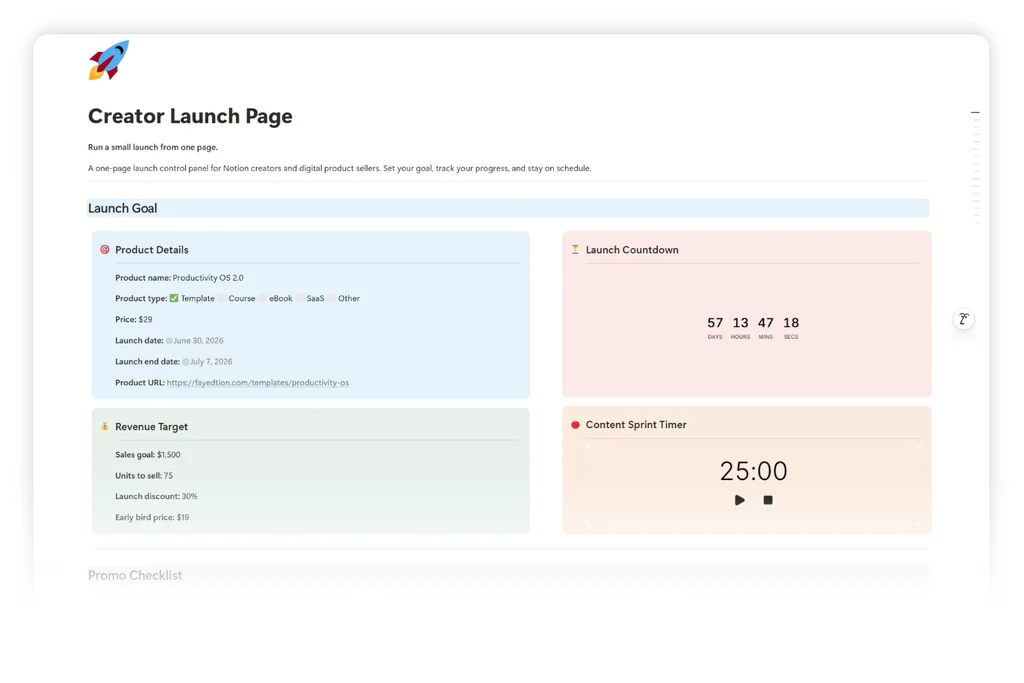
The Creator Launch Page template ships all seven blocks pre-styled. You fill in copy, drop in screenshots, and paste your checkout URL. The structure carries the buyer from cover to purchase without you rebuilding the flow every launch.
The Launch Page Workflow: One Page, One Owner, One URL
The value of a launch page in Notion is not the page itself. It is the workflow around it: one URL that every teaser link, every email, and every social post points at. The launch day workflow notion version of this looks like a small flowchart, not a checklist buried in Asana.
Diagram: Launch page workflow from asset gathering through post-launch review, with every step feeding the same Notion URL.
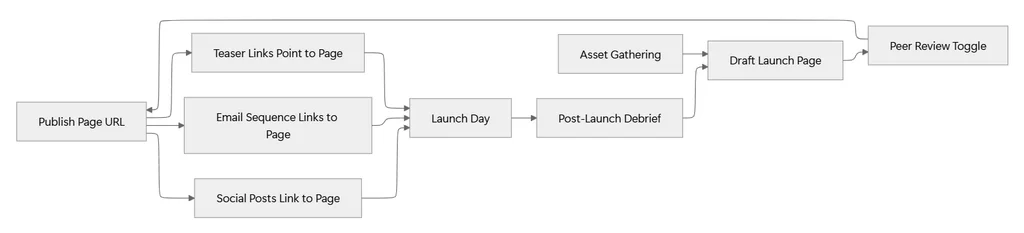
Every arrow in that diagram is a hand-off inside one Notion workspace instead of a hand-off across five tools. The Peer Review Toggle sits on the launch page itself as a collapsed section. The email sequence lives in a linked database. The post-launch debrief writes back into the same page as a dated log entry.
How to Build Your Notion Launch Page in 5 Steps
The workflow above is the destination. Here is how to assemble one launch page from a fresh Creator Launch Page template in a single Sunday.
Step 1: Duplicate the Template and Rename the Cover (10 minutes)
Open the Creator Launch Page template and duplicate it into your workspace. Rename the page to the exact product name your buyer will see. Replace the cover image with your product cover, sized 1500 by 600 pixels. Set the page icon to your product emoji or logo. Two minutes on the cover saves ten minutes of confusion later, because every teaser link inherits the cover as its social share preview.
Step 2: Write the One-Line Promise Before Anything Else (15 minutes)
Skip the feature list. Skip the FAQ. Open a blank line under the cover and write one sentence answering the question, “What does this product help me do?” Keep it under fifteen words. The one-line promise is the first thing a scrolling stranger reads and the last thing they remember before they click checkout. The Creator Launch Page holds a swipe file of proven one-liners if you get stuck.
Step 3: Fill the Feature Blocks With Real Screenshots (30 minutes)
Open the product itself and screenshot the three to six most visible features. Drop each screenshot into the feature blocks on the launch page. Under each screenshot, write two sentences: what the feature is, and what it saves the buyer. No adjectives. No superlatives. A creator launch checklist notion approach means every feature block is a claim you can defend if asked.
Step 4: Copy in the FAQ Block and Answer the Five Real Questions (20 minutes)
The FAQ block in the template comes with five placeholder questions. Replace each one with a question a buyer has actually asked you. If you have never sold this product before, use the five your friends asked when you told them about it. Answers stay under three sentences. Long FAQ answers signal the sales copy above them did not do its job.
Step 5: Publish and Wire Every Link to This Page (10 minutes)
Toggle Share to Web on the page. Copy the public URL. Now open every place your product is going to be mentioned this week: your Gumroad description, your email draft, your Twitter draft, your LinkedIn draft, your Discord announcement. Replace every reference to the product with the launch page URL. This single act of wiring is the reason a notion product launch template beats a Google Doc: the buyer meets one page, not five drafts.
Frequently Asked Questions
Do I need a paid Notion plan to publish a launch page?
No. The free Notion plan allows unlimited pages and the Share to Web toggle. You only need a paid plan if you want unlimited file uploads over 5 MB, page analytics, or a workspace with more than one editor. For a solo creator running one launch, the free plan is enough. Notion pricing covers the details.
Can I use a custom domain instead of a notion URL?
Yes. Three tools handle this: Super, and Notion. Each one lets you map a notion.com page to your own domain, with light styling controls and faster page loads. Pick Notion Sites first if your launch page has to ship this week and you already use Notion.
How is this different from a Gumroad product page?
Gumroad gives you a checkout page. A notion sales page template gives you a landing page that sells the product before the buyer sees the checkout. You keep the Gumroad checkout button on your launch page, and you use the Notion page for the long-form pitch, the feature screenshots, and the FAQ. The two work together. One does not replace the other.
Can I embed a checkout inside the Notion page?
Yes. Paste a Gumroad, Lemon Squeezy, or Stripe checkout link into the launch page, and Notion renders it as a linked block. For inline checkout, use the Gumroad overlay embed or a Stripe Payment Link. Both open a checkout modal on top of your Notion page without redirecting the buyer to a separate site.
How long does one launch page take to build?
The five-step version above takes about 85 minutes from a duplicated template to a published URL. The full how to launch a product on notion flow (including the internal launch plan toggle, the email sequence, and the post-launch debrief) takes a full Sunday, roughly four hours. A rebuilt Webflow launch page for the same product usually takes two to three days.
Key Takeaways
- A notion launch page replaces the six-tab launch scramble with one storefront page that holds cover, promise, features, screenshots, FAQ, and checkout.
- The right seven-block structure carries a buyer from cover to purchase without rebuilding the flow every launch.
- One URL for the launch means every teaser link, every email, and every social post points at the same page, and every update propagates automatically.
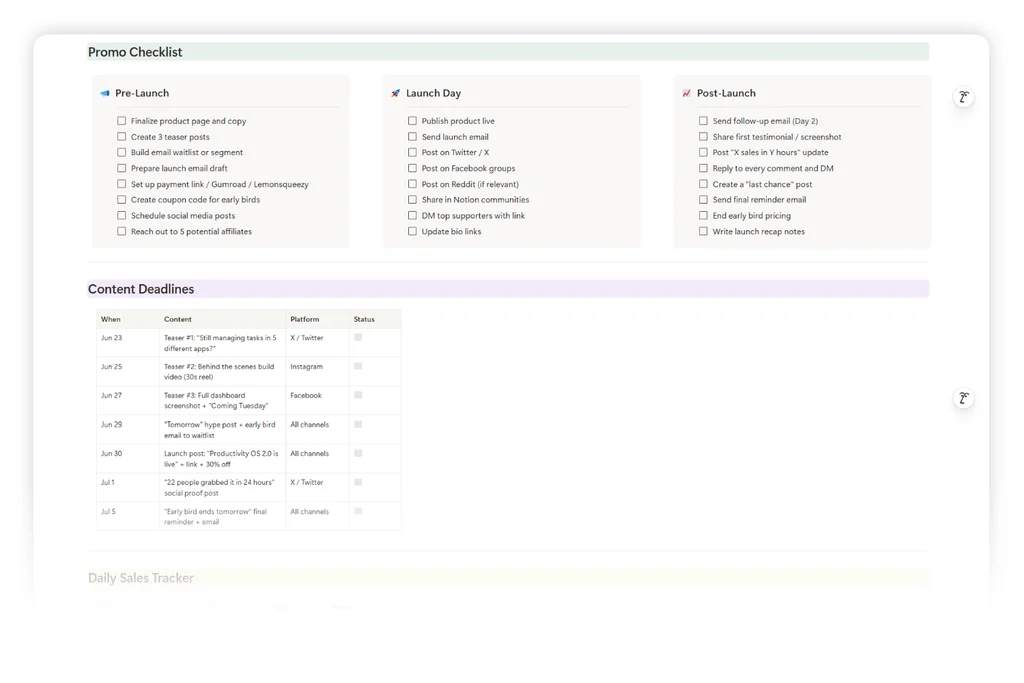
- The Creator Launch Page template ships with all seven blocks pre-styled, plus an internal launch plan toggle below the buyer FAQ.
- The five-step Sunday build (duplicate, one-line promise, feature screenshots, real FAQ, wire every link) takes about 85 minutes end to end.
- A Notion launch page is not a replacement for Gumroad or Stripe checkout. It is the sales page that lives above the checkout button.
- Custom domains through Notion Sites, Super, or Potion turn a notion URL into a branded storefront without a Webflow rebuild.
- The launch page doubles as the internal launch plan, so the buyer view and the team view stay in one workspace across every future launch.
An Alternative Way to Close the Launch Loop
If the five-step build feels heavy for a first launch, run it as a two-step waitlist page instead. Duplicate the Creator Launch Page template, strip it down to the hero, the promise, and a Tally waitlist form, and publish. Send the URL to your list on Monday. Watch how many people sign up. Then build the full seven-block launch page on Wednesday with the copy you already know resonates, because the waitlist form told you which pain points people typed into the notes field. This approach reduces launch-day risk and lets the first version of your launch page teach you what the second version should say.
Your Next Step
The framework above is the destination. The next move is putting it on a real product page you can send by Sunday.
